Naba Ahmed
December 15, 2025
Every teacher wants to create a classroom where students are genuinely captivated by the material. But building those dynamic, personalized learning experiences takes an incredible amount of time and effort. This is the real promise of using AI for lesson plans. These tools streamline the foundational work of creating materials and structuring activities. This gives you time to focus on delivery and engagement.
When you can quickly generate high-quality, interactive, and customized lessons, your students are the ones who benefit. They get a more engaging learning environment that keeps them focused, encourages participation, and helps them retain what they’ve learned.

What is an AI lesson planner?
An AI lesson planner is a smart tool designed to help you create lesson plans more efficiently. Think of it as a digital assistant that uses artificial intelligence to generate customized content, suggest learning activities, and draft instructional language. All of this content can be tailored to your specific subject, grade level, and student needs. It’s here to help you with the heavy lifting of prep work.
How has lesson planning evolved
Let’s be honest: traditional lesson planning can be a grind. Usually, you spend countless hours staring at a blank page, searching for resources, and manually creating all assignments. With the arrival of AI, that entire process gets a modern update. These tools streamline the administrative side of planning. Now, you can spend less time on paperwork and more time focusing on connecting with your students. It’s about working smarter, not harder.
How AI improves the planning process
AI improves your workflow by acting as a creative partner and an efficient assistant. It automates repetitive tasks like drafting learning objectives or generating quiz questions, giving you back valuable time. Need fresh ideas for a history lesson? AI can brainstorm engaging project prompts or discussion starters. More importantly, it helps you differentiate instruction. AI can help customize resources and activities, tailored to meet the unique learning needs of each student. This ensures no student feels left behind.
Prezi AI is especially useful when you’re ready to turn a plan into a lesson students will lean into. With Prezi, you can transform your outline, notes, or even an uploaded file into a presentation, fast. Student attention and engagement is top of mind with Prezi.
Key benefits for you and your students
Using AI for lesson planning is a win-win for everyone. For you, the most immediate benefit is saving time and reducing the mental load of planning from scratch. This allows you to create effective, research-based materials without the burnout. For your students, this translates into a more dynamic and engaging learning experience. When you have the tools to quickly build high-quality, interactive, and personalized lessons, students are more likely to stay focused, participate, and retain what they’ve learned.
Prezi AI can support you with putting together a lesson plan presentation in a matter of minutes. You’re not just saving time behind the scenes. You’re creating a more interactive, visual learning experience that supports discussion, attention, and retention. It’s a simple way to upgrade delivery without adding hours to your prep.

Top AI tools for lesson planning
Once you start looking, you’ll find a whole world of AI tools designed specifically for educators. It’s exciting, but it can also be a little overwhelming to figure out which one is right for you. Some platforms are all-in-one powerhouses that can help with everything from curriculum mapping to generating quizzes, while others are specialized tools that excel at one particular thing, like creating stunning presentations (Prezi AI) or gamifying your classroom. Think of this list as your curated guide to some of the best and most popular options out there.
We’ve broken down what makes each tool unique so you can find the perfect match for your teaching style and your students’ needs. Whether you’re looking to save a few hours on administrative tasks each week, find fresh ideas for a topic you’ve taught for years, or create more personalized learning paths for your students, there’s an AI assistant waiting to help. The goal isn’t to replace your expertise but to give you a powerful sidekick that handles the tedious work, freeing you up to focus on what you do best: teaching. Let’s explore some of the top contenders.
MagicSchool
Think of MagicSchool as your personal AI assistant, built to help you manage your daily workload and prevent burnout. It’s a comprehensive platform designed by educators who understand the pressures of the classroom. With over 60 different tools, it can help you with everything from drafting lesson plans and differentiating materials to writing assessments and communicating with parents. MagicSchool is a fantastic all-in-one solution if you’re looking for a tool that can save you significant time across a wide range of administrative and planning tasks. It lets you pour that saved energy back into your students.
Eduaide
Eduaide is worth a look if you value tools created by people who have been in your shoes. It was designed by teachers with the specific goal of streamlining the resource creation process. Use Eduaide to generate high-quality, customizable teaching resources in a fraction of the time. That way, you don’t have to spend hours building materials from scratch. It’s particularly helpful for generating things like information guides, project outlines, and vocabulary lists. The platform focuses on giving you a strong starting point that you can then easily tweak and perfect to fit your classroom’s exact needs.
Slidesgo AI lesson plan generator
Sometimes you just need a solid lesson plan, and you need it fast. For those moments, the AI lesson plan generator from Slidesgo is a great free tool. It’s incredibly straightforward: you simply select the grade level, provide a brief description of your lesson topic, and choose your classroom setting. In seconds, it produces a structured lesson plan that you can use as is or build upon. It’s a perfect example of how AI can handle the initial legwork of structuring a lesson, giving you a clear and organized framework to start with.
One thing to keep in mind: some AI tools are best for building the plan, while others shine when it’s time to present it. If your goal is student engagement, you’ll want a tool that supports how you teach—not just what you teach. That’s where presentation-focused AI tools can make a noticeable difference.
Prezi AI
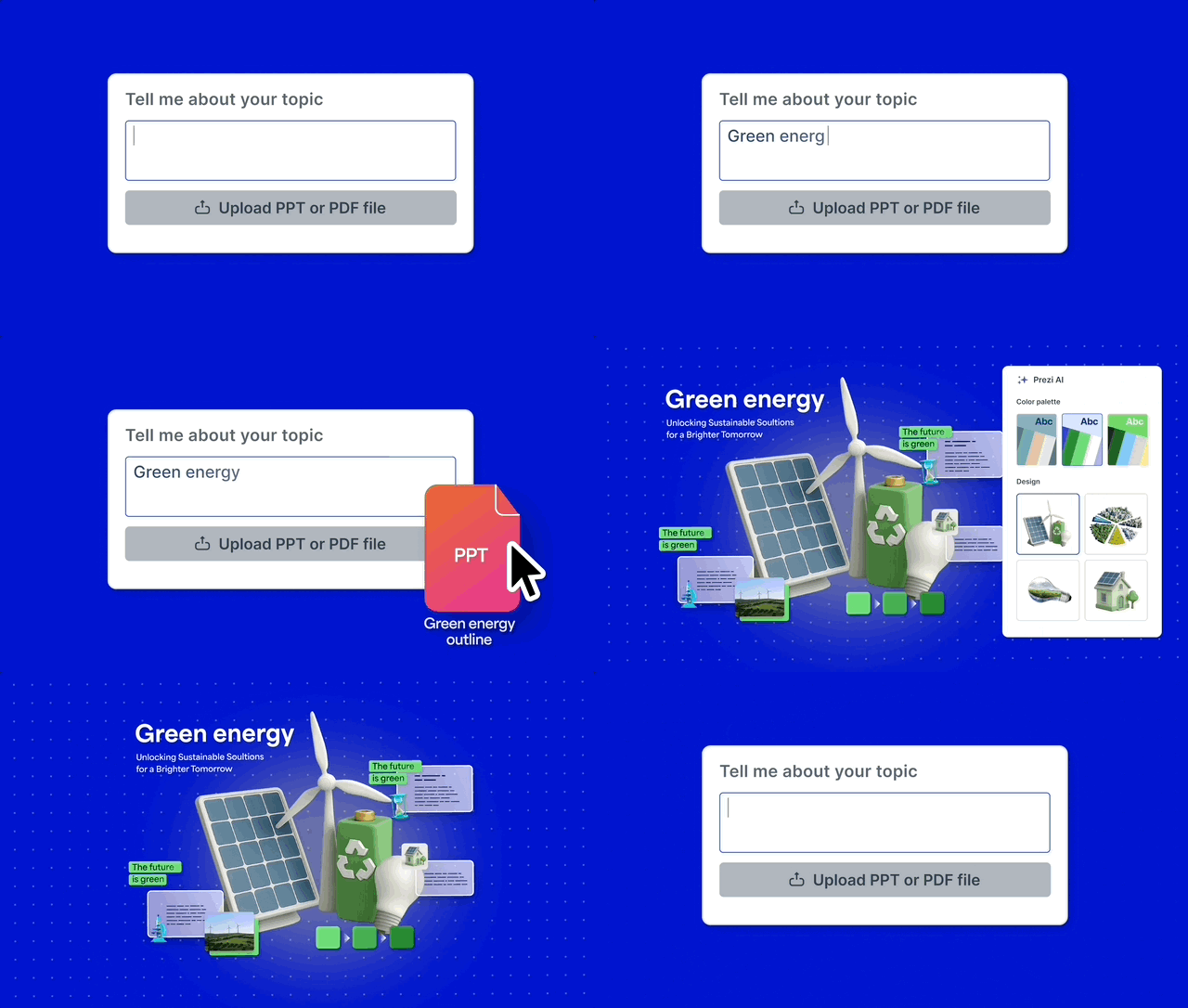
A great lesson plan is only half the battle; you also have to deliver it in a way that captures your students’ attention. This is where Prezi AI shines. While other tools focus on just the document, Prezi helps you create the dynamic, visual experience that brings your lesson to life. It integrates AI with Prezi’s unique conversational format to build stunning, attention-grabbing presentations in minutes from a simple prompt. AI tools are revolutionizing lesson planning by automating tasks and generating ideas, and Prezi ensures the final delivery is just as innovative and engaging as the plan itself. Simply drop in your prompt or upload an existing file, and it will transform your content into a presentation, designed to capture attention.
ChatGPT for ESL Teachers
While not a dedicated education platform, ChatGPT has become a go-to for many teachers because of its incredible versatility. It’s especially powerful for creating customized materials for specific student needs, like those in ESL classrooms. Teachers have shared stories of cutting worksheet creation time from hours down to minutes. You can ask it to generate reading passages at a certain level, create vocabulary exercises, or even draft role-playing scenarios. Its strength lies in its flexibility, acting as a creative partner for any subject or need.
Planboard
If you love the satisfaction of a perfectly organized planner, you’ll appreciate Planboard. It’s a digital lesson planner that helps you organize your subjects, schedule your semesters, and ensure you’re meeting curriculum standards. While it’s less about AI content generation, it’s an essential tool for structuring your academic year. Planboard by Chalk makes it easy to attach files, reuse lessons from previous years, and see your week or month at a glance. It’s the modern, digital evolution of the classic teacher planbook, designed for seamless organization.
Chalk
Planboard is just one piece of a larger ecosystem. Chalk is the full suite of tools for educators who want an integrated classroom management system. It combines lesson planning in Planboard with a powerful gradebook called Markboard, as well as tools for attendance. This connection means you can link your lesson plans directly to assessments, creating a smooth workflow from planning to grading. If you’re looking for a single platform to manage the core functions of your classroom, Chalk provides a unified and comprehensive solution.
Classcraft
Ready to make your classroom more engaging? Classcraft uses the principles of gaming to help you manage your classroom and motivate your students. You can turn your lesson plan into a quest where students work in teams, earn points for positive behavior, and unlock special powers (like handing in an assignment a day late). It’s a unique approach that transforms classroom management into a collaborative adventure. While it doesn’t write lesson plans for you, it provides a powerful framework for structuring your class in a way that fosters participation, teamwork, and student buy-in.
What to look for in an AI lesson planner
Choosing the right AI lesson planner feels a lot like picking a co-teacher. You want a partner that understands your goals, works with your style, and ultimately, helps your students succeed. As you explore different options, focus on tools that not only save you time but also enrich your teaching. Look for a platform that offers a blend of automated efficiency and creative flexibility, allowing you to produce materials that are truly your own. The best AI tools act as a launchpad for your ideas, handling the repetitive tasks so you can focus on creating memorable learning experiences.
A great platform will help you with every stage of the process, from the initial build to the final delivery. It should give you the tools to not only structure your lesson but also to design engaging content that captures your students’ attention. Think of it as a support system that empowers you to be an even more effective and creative educator. By finding the right fit, you can streamline your prep work without sacrificing the quality and personal touch that make your teaching unique.

Automated content creation
A great AI lesson planner should take the tedious work off your plate. Think about all the time you spend creating worksheets, writing prompts, or searching for project ideas. The right tool can automate these repetitive tasks, generating high-quality first drafts in seconds. Instead of starting from a blank page, you get a solid foundation to build upon. This isn’t about replacing your expertise; it’s about augmenting it. AI can generate creative ideas and resources, freeing you up to focus on the more nuanced parts of teaching, like connecting with your students and refining the lesson to fit their specific needs.
Personalized learning paths
Every classroom is filled with students who have unique learning styles and needs. A standout feature of modern AI planners is their ability to help you create differentiated materials effortlessly. Tools like Eduaide are designed to generate varied activities that cater to diverse learners, helping you build a more inclusive classroom. Imagine creating three different versions of a reading comprehension activity—one for struggling readers, one for grade-level students, and one for those needing a challenge—all from a single prompt. This level of student-centered personalization was once a time-consuming challenge, but AI makes it an achievable goal for your daily planning.
Features that save you time
Let’s be honest: the biggest promise of AI for educators is getting some of your valuable time back. The best tools are designed with teacher burnout in mind. Platforms like MagicSchool claim they can save you up to 10 hours a week by streamlining everything from generating rubrics to writing parent emails. Think of it as an assistant that handles the administrative side of teaching. This reclaimed time is invaluable. It’s more time to mentor students, collaborate with colleagues, or simply recharge your own batteries. When you’re looking at different AI tools, always ask: Will this genuinely make my workload lighter?
Interactive and engaging elements
Your lessons are more than just information on a page; they’re experiences. Look for an AI tool that helps you create dynamic and interactive content that captures students’ attention. Some platforms, like Slidesgo’s AI Lesson Plan Generator, can help you quickly structure custom plans that go beyond static text. The goal is to find a tool that helps you build presentations, activities, and discussions that feel alive. This is where you can lean on your own creativity, using AI to handle the initial structure while you focus on adding the compelling visuals and interactive moments that make learning stick.
Analytics to track student progress
Understanding what your students know and where they’re struggling is fundamental to good teaching. While many AI planners focus on content creation, some are beginning to incorporate features that help you assess student progress. These tools can help you quickly generate quizzes, exit tickets, and other formative assessments based on your lesson content. By turning minutes saved into hours over time, AI frees you up to analyze the results and identify learning gaps. This allows you to provide targeted support exactly where it’s needed, making your instruction more effective and responsive.
Customization and flexibility
An AI tool should adapt to your teaching style, not the other way around. The best platforms offer deep customization, allowing you to tweak and refine every piece of generated content until it perfectly matches your vision. You should be able to adjust the tone, complexity, and format with ease. It’s also important to choose a tool that prioritizes data security. For example, platforms like MagicSchool are built to be safe and secure with your data, giving you peace of mind. This flexibility ensures the final product is authentically yours and aligned with your pedagogical approach.
Accessibility features
Creating an equitable learning environment means ensuring all materials are accessible to every student. When evaluating an AI lesson planner, check for its commitment to accessibility. AI-generated content should be compatible with tools like screen readers, and the platform should allow you to create materials that meet various accessibility standards. It’s also crucial to remember that AI is a starting point. As an educator, your review is essential to ensure that lesson plans truly meet the individual needs of students with disabilities, making necessary adjustments to provide the right support.
Tools for team collaboration
Planning is often a team sport. If you work closely with a grade-level team, department, or co-teacher, look for an AI tool that supports collaboration. Some platforms allow you to share prompts, templates, and generated materials, ensuring consistency and saving everyone time. This collaborative approach can be especially powerful for teams, like ESL teachers who share effective prompts to create resources for English learners. By working together within a shared platform, you can build a library of high-quality, AI-assisted resources that benefit the entire school community.

How to use AI in your lesson planning
Jumping into AI for lesson planning can feel like a big step, but it’s really about working smarter, not harder. These tools are designed to be your co-pilot, handling the tedious parts of prep so you can focus on what you do best: teaching. Think of AI as a way to automate repetitive tasks, generate creative ideas, and tailor resources to fit your classroom’s specific needs. By following a few simple guidelines, you can make AI a seamless and powerful part of your teaching toolkit.
Getting started: Best practices
The best way to begin is to start small. You don’t need to overhaul your entire curriculum overnight. Pick one lesson plan or even just one activity to create with an AI tool. Maybe you need a new discussion prompt for your history class or a quick vocabulary quiz. Use an AI planner to generate a first draft. This lets you get a feel for how the tool works without feeling overwhelmed. As you get more comfortable, you can gradually use AI for more complex tasks, like mapping out an entire unit or creating a dynamic presentation to introduce a new topic.
Balance AI assistance with your own creativity
Remember, AI is a powerful assistant, but it’s not a replacement for your professional expertise. An AI-generated lesson plan can sometimes feel a bit generic or miss the unique spark that makes your teaching special. Use the AI’s output as a starting point; as a solid foundation you can build upon. Your creativity, personal stories, and understanding of your students are what will bring the material to life. Think of AI as the tool that builds the structure, while you’re the one who adds the color, texture, and heart that make the lesson truly engaging and memorable.
Understand privacy and ethical rules
When you use any digital tool, it’s essential to think about student privacy. This is especially true for AI. Be very careful about the information you input. Never enter students’ full names, birthdays, or any other personally identifiable information into a public AI platform. It’s your responsibility to protect that data. Before you start, make sure you understand the privacy laws that apply to you, like the Family Educational Rights and Privacy Act (FERPA). Always check your school or district’s policies on using AI tools to ensure you’re using them responsibly and ethically.
Stay compliant with AI in education
Beyond general privacy laws, many states are now creating their own rules for how AI can be used in schools. These laws often focus on making sure AI tools are used fairly and transparently, without creating biases. It’s a good idea to stay informed about your state and district’s specific guidelines. This isn’t meant to be intimidating; it’s about being a responsible professional. Knowing the rules helps you use these amazing new technologies with confidence, ensuring you’re providing the best and safest learning experience for your students. Your administration or tech department should be able to provide guidance on approved tools and practices.
Overcome common challenges
While AI can be a huge time-saver, it’s not perfect. One of the most common challenges is that the content it generates might not be completely accurate or appropriate for your students’ age group. That’s why your review is so important. Always read through and edit anything an AI creates. Check the facts, adjust the tone, and make sure the activities are a good fit for your classroom. Treating the AI’s output as a first draft—not a final product—is the key. This simple step ensures the final lesson plan is high-quality, accurate, and perfectly tailored to your students.
How to choose the right AI tool for you
With a growing number of AI lesson planners available, picking the right one can feel like another task on your already-full plate. It’s easy to get caught up in the hype, but the truth is, not all AI tools are created equal. The wrong one can add more complexity to your workflow, leaving you frustrated and wondering if you’re better off sticking to your old methods. But finding the perfect fit doesn’t have to be complicated. The goal is to find a tool that complements your teaching style and genuinely makes your life easier. Think of it as finding a reliable teaching assistant—one that’s ready to help you brainstorm, create, and customize whenever you need it.
The best AI lesson planner for you is one that feels like a natural extension of your own expertise. It should automate the tedious parts of planning so you can focus more on the creative, human elements of teaching that you love. It’s about finding a partner that helps you reclaim precious time, which you can then reinvest into connecting with your students, providing one-on-one support, or even just catching your breath. To make a confident choice, you don’t need to be a tech expert. You just need to know what to look for. By focusing on a few key areas—from core features and pricing to usability and what other teachers think—you can select an AI partner that helps you and your students thrive.
Key factors to consider
Before you start comparing features, take a moment to think about your specific needs. What are you hoping to achieve with an AI tool? Are you looking to save time on administrative tasks, generate fresh ideas for class activities, or create more personalized materials for your students? The best tool for you will be one that aligns directly with your primary goals, whether you teach kindergarten reading or high school physics. Consider the subjects you teach and your students’ needs to narrow down your options from the start.
Understand pricing and plans
Let’s talk budget. AI tools come with various pricing models, from completely free versions to monthly subscriptions and school-wide licenses. Many platforms operate on a “freemium” model, offering basic features for free with the option to upgrade for more advanced capabilities. Always look for a free trial to test-drive a tool before you commit financially. Don’t just look at the price tag; consider the value it offers in terms of time saved and resources created.
Find an easy-to-use interface
You’re a busy educator, not a software engineer. The last thing you need is a tool with a steep learning curve. A clean, intuitive interface is non-negotiable. You should be able to log in and start creating without needing to watch hours of tutorials. When you’re exploring a new platform, pay attention to how easy it is to find what you need. If the layout feels cluttered or confusing, it’s probably not the right fit for you long-term.
Check for system integrations
To make your workflow as smooth as possible, look for an AI tool that integrates with the systems you already use every day. Does it connect with Google Classroom, Canvas, or your school’s learning management system (LMS)? Can you easily export content to your favorite presentation software, like Prezi? Seamless integrations mean less time spent copying and pasting or toggling between different applications. As educators have found, it’s important to “assess a few AI tools with my colleagues and reflect on how they would impact our teaching.” A tool that fits neatly into your existing digital ecosystem will save you valuable time and energy.
How can I know what the best AI lesson plan generator is for me?
AI lesson planners aren’t about outsourcing your teaching—they’re about reclaiming your time. When you let AI take on the first-draft work (outlines, objectives, practice questions, differentiated versions), you free yourself to focus on what students actually remember: the relationships you build, the energy you bring, and the moments that make learning click. The best results come from using AI as a starting point, then applying your professional judgment to refine for accuracy, tone, and classroom fit.
As you explore tools like MagicSchool, Eduaide, Slidesgo, Prezi AI, and even ChatGPT, keep your priorities clear: protect student privacy, stay aligned with your standards, and choose platforms that match your workflow. Start small, iterate, and build a repeatable process you can rely on week after week. With the right approach, AI becomes a practical partner—helping you create more engaging, personalized lessons while reducing burnout and giving you more space to do the most human part of teaching. Use Prezi AI if you’re looking for a tool that will allow you to create lesson plans faster. Try it out now.
Frequently Asked Questions
Not at all. Think of it as a tool that handles the administrative grunt work, not a replacement for your expertise. An AI can draft a quiz or outline a project, but it can’t understand the unique dynamics of your classroom or connect with a student who needs extra encouragement. Using AI frees you from the blank page, giving you more time and mental energy to focus on the parts of teaching that truly matter—mentoring students, fostering curiosity, and bringing your unique creativity to each lesson.
Choose the AI lesson plan generator that solves your biggest pain point first—quick structure, differentiation, assessments, or engaging delivery. Run a quick test by generating the same lesson in 2–3 tools and pick the one that needs the least editing and fits your workflow (exports, LMS, ease of use). Make sure it supports your grade level/standards and protects student privacy—never enter identifiable student info. The best choice is the one you’ll actually use consistently because it saves real time without sacrificing quality (ex: Prezi AI).
You definitely don’t need to be a tech wizard to use these platforms. Most are designed with busy teachers in mind and have very straightforward, intuitive interfaces. The best way to start is to pick one simple task, like generating discussion questions for your next chapter reading. Once you see how quickly it can produce a solid first draft, you’ll feel more confident exploring its other features.
This is where your professional judgment is essential. You should always treat AI-generated content as a first draft, not a finished product. It’s your job to review everything for factual accuracy, adjust the tone and complexity for your specific grade level, and ensure the material aligns with your curriculum. The AI is your assistant, but you are always the final editor and expert in the room.
Instead of getting lost in a long list of features, start by identifying your biggest pain point. Are you spending too much time creating worksheets? Look for a tool like Eduaide. Do you need help making your lessons more visually exciting? A tool like Prezi AI would be a great fit. Focus on finding a platform that solves your most pressing problem first. The right tool is the one that seamlessly fits into your workflow and gives you valuable time back.
Protecting student data is non-negotiable. The simplest rule to follow is to never input any personally identifiable information—like student names, birthdays, or ID numbers—into an AI tool, especially a public one like ChatGPT. Always use generic prompts. Before adopting any new platform, it’s also a good idea to check your school or district’s policies on approved AI tools to ensure you’re staying compliant and keeping your students’ information safe.