Naba Ahmed
February 18, 2026
Let’s be honest, the phrase “PowerPoint agenda slide” doesn’t always spark excitement. Too often, it’s seen as a dry, obligatory list of topics. But what if we reframed it? What if your agenda could be more than just a checklist? We specialize in transforming presentations from static displays into dynamic storytelling experiences. Even if you’re working within a traditional format, the principles of clear communication and thoughtful design can turn your agenda into a powerful tool that signals clarity, professionalism, and respect for your audience’s attention from the very first moment.
Key Takeaways
- Give your audience a clear roadmap: Use an agenda slide to outline your presentation’s key topics, helping everyone follow along and stay focused.
- Design for impact and readability: Craft your agenda with concise titles, a logical flow, and clean visuals to ensure it’s both engaging and easy to understand at a glance.
- Create agendas efficiently: Steer clear of common errors like clutter or inconsistency, and use available tools and templates to build professional agenda slides with less effort.
Why your presentation needs an agenda slide
Ever walked into a meeting or lecture and felt a bit lost before it even began? That’s often what happens when a presentation skips a crucial element: the agenda slide. Think of it as the friendly welcome and roadmap for your audience. It’s not just a formality; it’s a powerful tool that sets the stage for a successful presentation. By adding an agenda slide, it shows your audience that you value their time and have a clear, organized plan.
Set clear expectations from the get-go
An agenda slide is your first opportunity to show your audience what’s in store. It clearly outlines the main topics you’ll cover, giving them a mental framework for the information to come. This isn’t just about listing points; it’s about demonstrating a logical flow. When your audience sees the journey mapped out, they can better prepare to absorb each piece of information. This upfront clarity helps reduce confusion and allows everyone to be on the same page from the very beginning.
Keep your audience engaged and focused
Let’s be honest, attention spans can wander, especially during longer presentations. An agenda slide acts as a helpful anchor, keeping your audience oriented. Knowing what’s coming next, and how far along you are helps people stay focused. It’s like having a “you are here” marker on a map. This prevents that feeling of being adrift in a sea of information.
Improve your presentation’s structure and flow
A well-crafted agenda slide isn’t just for the audience; it’s a fantastic tool for you, the presenter, too. It forces you to think critically about your content and organize it in the most effective way. This roadmap also helps you stay on track, ensuring you cover all essential points without getting sidetracked.
What makes an agenda slide truly effective?
An agenda slide is so much more than just a quick list of topics you plan to cover. Think of it as the friendly handshake at the beginning of your presentation. It sets the tone, builds anticipation, and shows your audience you’ve thoughtfully prepared for them. When done right, an agenda slide is a powerhouse of clarity, helping everyone in the room, or on the call, understand where you’re going and why each part of your talk matters. It’s your first opportunity to demonstrate organization and respect for your audience’s time.
A truly effective agenda slide doesn’t just inform; it engages. It acts as a roadmap, guiding your listeners through the journey of your presentation. It’s a subtle promise that you’ll manage the time well, covering what you’ve set out to discuss. By focusing on clear titles, logical organization, realistic timing, simple visuals, and overall simplicity, you can transform your agenda into a key element for your presentation’s success. We’ll explore how to build these elements into your next agenda.
Write clear, concise titles for each section
The titles on your agenda slide are like headlines for each chapter of your presentation. They need to be instantly understandable and give a clear preview of what’s coming. Vague or overly complex titles can confuse your audience before you even start. Instead, aim for short, punchy phrases that capture the essence of each section. Use strong action verbs and specific nouns, and steer clear of jargon unless you’re absolutely certain your entire audience is familiar with it. This clarity helps set expectations and allows your audience to mentally prepare for the information ahead.
Organize your content logically
The order in which you present your topics is crucial. A logically structured agenda helps your audience follow your train of thought and see how each piece of information connects to the bigger picture. It also helps you, as the presenter, stay organized and ensure a smooth delivery. Consider the narrative arc of your presentation: What does your audience need to know first to understand subsequent points? Is there a natural progression, like problem to solution, or chronological order? Arranging your agenda items in a way that makes intuitive sense will keep your audience engaged and prevent them from feeling lost or wondering why you’re jumping between unrelated ideas.
Allocate a realistic time for each topic
While you might not always display exact timings on the agenda slide itself (unless it’s a very formal or lengthy presentation), having a realistic time allocation in mind for each section is key. This practice helps you manage your presentation flow and ensures you give adequate attention to each important point without rushing or dragging. Knowing how much time you plan to spend on each topic also helps your audience gauge the depth of discussion for each item. It’s a good idea to allocate time for each topic to ensure you can cover everything thoroughly and still leave room for questions if planned. This thoughtful planning demonstrates respect for your audience’s time and keeps your presentation on track.
Incorporate simple visuals or icons
A little bit of visual flair can make your agenda slide much more engaging and easier to digest. Simple icons or subtle graphics related to each topic can break up the text and provide quick visual cues. For instance, a lightbulb icon for an “ideas” section or a gear icon for “how it works.” The key here is “simple.” You don’t want your visuals to overshadow the information or clutter the slide. These visual elements should enhance understanding and align with the overall design and branding of your presentation.
Prioritize simplicity and overall clarity
When it comes to agenda slides, less is almost always more. Your goal is to provide a clear, at-a-glance overview. A cluttered agenda can be counterproductive, making it hard for people to quickly grasp the main points. Strive for a clean layout with plenty of white space. Use a consistent font and font size that’s easy to read from a distance. If you have many sub-points, consider grouping them under broader headings. The ultimate aim is for your audience to look at the agenda and immediately understand the structure and flow of your presentation, feeling confident and ready to listen.
Design an agenda slide that captivates
Your agenda slide often feels like a small, almost administrative detail in the grand scheme of your presentation, doesn’t it? But I’ve learned over years of crafting and delivering presentations that it’s so much more than just a list of topics. It’s your audience’s very first glimpse into the structure and flow of your ideas. Think of it as the opening credits to a great movie – it sets the tone, builds anticipation, and subtly promises value.
A well-designed agenda slide does more than inform; it invites and intrigues. It shows your audience that you’re organized, you respect their time, and you have a clear path to deliver your message. This seemingly simple slide can be a powerhouse for engagement if you approach its design with intention. It’s about transforming a basic outline into a visually appealing and highly effective component of your narrative. So, instead of rushing past it, let’s focus on how to craft an agenda slide that truly captivates, making your audience lean in, ready to hear what you have to say. We’ll cover key strategies, from visual hierarchy to font choices, ensuring your agenda sets a strong, positive stage for everything that follows.
Create a clear visual hierarchy
Imagine your agenda slide as the table of contents for your talk. A clear visual hierarchy is key to this, helping your audience instantly distinguish between main topics and any sub-points. You can achieve this by playing with size, weight, and color. For instance, make your main section titles noticeably larger or bolder. If you have sub-topics, indent them and use a slightly smaller or lighter font. Consistent numbering (1, 2, 3) or a clean bullet style (●, ■) for main items also helps delineate them clearly. This careful arrangement isn’t just about looking neat; it actively guides the viewer’s eye through the information logically. An agenda slide is crucial for any presentation, and a strong hierarchy ensures it will be understood.
Choose a cohesive color scheme
Color isn’t just for decoration; it’s a powerful psychological tool in presentation design, especially for your agenda. A cohesive color scheme instantly makes your slide look more professional and thoughtfully prepared. My advice? Stick to two or three key colors. These should ideally align with your overall presentation theme, your company’s branding, or the mood you want to create. Using a consistent color scheme across all your slides, including the agenda, creates a sense of unity and reinforces your message subtly. Be wary of using too many bright or clashing colors – this can be visually jarring and distract from your points. Instead, aim for a balanced palette that’s easy on the eyes. This contributes to a calm, professional atmosphere, allowing your audience to focus on your content rather than being distracted by a chaotic color explosion.
Select readable and professional fonts
Your font choices are critical for the agenda slide’s success, directly impacting readability and the overall professional feel. While a fancy script font might look artistic on its own, for an agenda, clarity is king. It’s generally best to stick with clean, legible options. Standard sans-serif fonts like Arial, Helvetica, Open Sans, or Calibri are excellent choices for presentations because their simple letterforms are easy to read. Ensure your font size is generous – think 24 points or larger for main agenda items. And consistency is key; use the same font family you plan to use throughout your presentation. Your goal here is effortless comprehension, making it easy for your audience to quickly scan the topics.
Balance your text with white space
It’s so tempting to fill every inch of your slide, but resist that urge, especially on your agenda. One of the fastest ways to make your audience tune out is by presenting them with a wall of text. Your agenda slide should be a concise, digestible overview, not a miniature essay. This is where the magic of white space (or negative space) comes in, which are those lovely empty areas around your text and other design elements. Generous white space makes your slide feel open, airy, and less intimidating. It gives each item room to breathe, making it easier for your audience to scan and absorb the information. Opt for bullet points or short, punchy phrases for your agenda items rather than full sentences. This keeps it scannable and inviting, making your audience feel informed, not inundated.
Add engaging (but not distracting) visuals
Clarity and conciseness are paramount for an agenda, but that doesn’t mean it has to be visually dull! Thoughtfully chosen visuals can elevate your agenda slide from a simple list to an engaging signpost. Consider using simple, clean icons next to each agenda item – a lightbulb for an ‘ideas’ section, or a gear for ‘process,’ for example. These small touches add visual interest and can even aid comprehension by providing a quick visual cue. Subtle background graphics or a well-placed, relevant image (that doesn’t compete with text) can also work. The absolute key here is balance: visuals should support and enhance your content, not overshadow or distract from it. Ensure any visuals align with your overall presentation branding and contribute to a clean, professional look rather than creating visual noise.
Common agenda slide mistakes to sidestep
Crafting that perfect agenda slide is a great step, but sometimes, even with the best intentions, we can miss the mark. These aren’t just minor slip-ups; they can impact how your audience perceives your entire message and how effectively you achieve your presentation goals. Knowing a few common tripwires can help you create an agenda that truly supports your presentation and keeps your audience on board.
Overloading your slide with too much information
It’s tempting to list every single detail on your agenda, but this can quickly overwhelm your audience. Remember, the agenda is a guide, not the entire script. Trying to cram too many topics onto one slide can lead to rushed discussions and leave important points unresolved. Your meetings and presentations should concentrate on specific goals. A cleaner approach is to focus on 3-5 key topics. If a point needs more explanation, you can always elaborate when you get to that part of the presentation. Think of your agenda slide as the chapter titles of a book – clear, concise, and inviting. This helps maintain focus and ensures each subject gets the attention it deserves.
Forgetting your audience’s needs and perspective
Your agenda isn’t just for you; it’s primarily for your audience. A common mistake is designing it without thinking about what they need to see and know. Failing to tailor your presentation, starting with the agenda, can lead to disengagement before you even begin your first main point. To avoid this, put yourself in their shoes. What information will help them follow along? What parts of the presentation are most relevant to their interests or concerns? Understanding your audience’s needs is absolutely crucial for effective communication. Make sure your agenda highlights the value and relevance of each section for them, so they feel invested right from the start.
Using inconsistent design elements
Imagine reading a book where every chapter uses a different font and layout – it would be pretty jarring, right? The same applies to your presentation. Your agenda slide sets the visual tone, and if its design is wildly different from your other slides, it can be confusing and make your whole presentation feel disjointed. Not maintaining a consistent design can detract from the important message you are trying to convey. Stick to the same color palette, fonts, and overall style that you use throughout your presentation.
Mismanaging or omitting time cues
Have you ever been in a presentation, wondering how much longer it will last or if there will be time for questions? That’s often the result of an agenda that doesn’t manage time expectations. Including estimated timings for each section on your agenda slide is a small detail that makes a big difference. It shows respect for your audience’s time and helps keep the presentation on track. Be realistic with your allocations, and if possible, include a specific slot for Q&A. This provides an opportunity for interaction and helps remove uncertainty. Clearly communicated time cues make everyone more comfortable and the meeting more productive.
Creating an agenda that lacks visual appeal
While your agenda slide needs to be informative, it doesn’t have to be boring. A wall of text or a long list of bullets can make your audience’s eyes glaze over before you’ve even started. Overloading slides with text makes them less engaging. Instead, think about how you can enhance your message with simple visuals. Consider using icons next to agenda items, a clean layout with plenty of white space, or a subtle background that aligns with your presentation’s theme. The goal is to make the agenda easy to read and visually digestible, so it draws people in rather than pushing them away. A visually appealing agenda sets a positive tone for the rest of your presentation.
Top tools and resources for crafting your agenda slide
Creating a compelling agenda slide doesn’t have to feel like a chore. Honestly, with the right tools at your fingertips, you can design an agenda that not only informs but genuinely engages your audience right from the start. The key is finding a tool that resonates with your personal style and meets the specific demands of your presentation. Whether you’re a fan of traditional software, thrive on collaborative cloud-based platforms, or are looking to make a splash with dynamic visuals, there’s definitely something out there for you.
Think about what you want your agenda to achieve. Is it purely informational, designed to give a straightforward roadmap? Or do you want it to set an energetic tone, hinting at the exciting content to come? Perhaps you need something highly professional for a corporate setting, or maybe a more creative and flexible design for an educational workshop. Understanding these nuances will guide you to the best resource. Some tools excel at structured, classic layouts, while others offer unparalleled freedom for visual storytelling. We’ll explore a variety of options, from industry standards to innovative platforms, each with unique strengths. Let’s look at some of the top tools and resources that can help you build that perfect agenda slide, making your presentation planning smoother and your delivery even more impactful, ensuring your audience is with you every step of the way.
Prezi AI: The smartest way to build your agenda slide
If you want an agenda slide that’s tailored to your specific content rather than adapted from a generic template, Prezi AI is in a league of its own. While other tools give you a blank canvas or a pre-built layout to fill in, Prezi AI actually generates a complete, structured presentation from a single prompt, and that intelligence extends to your agenda from the very start.
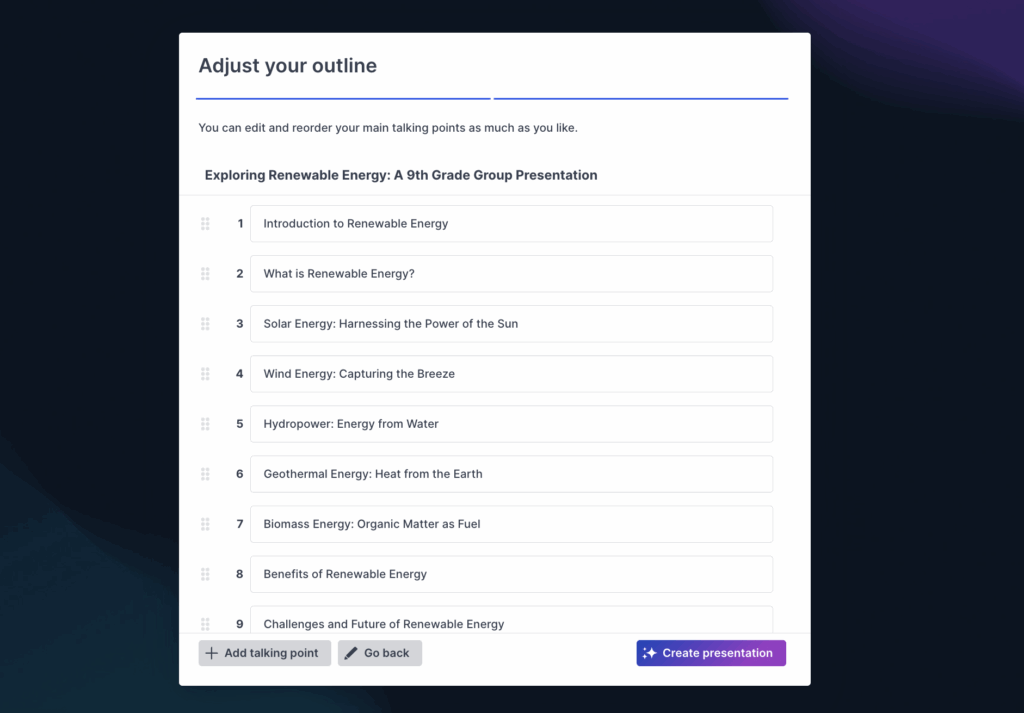
When you describe your topic to Prezi AI, it doesn’t just produce placeholder text. It understands the shape of your content and builds an agenda that reflects the actual flow of your ideas, with logical sequencing and clear section titles already matched to your subject matter. The result is an agenda that feels purposeful and cohesive, not like an afterthought you dropped in at the last minute.
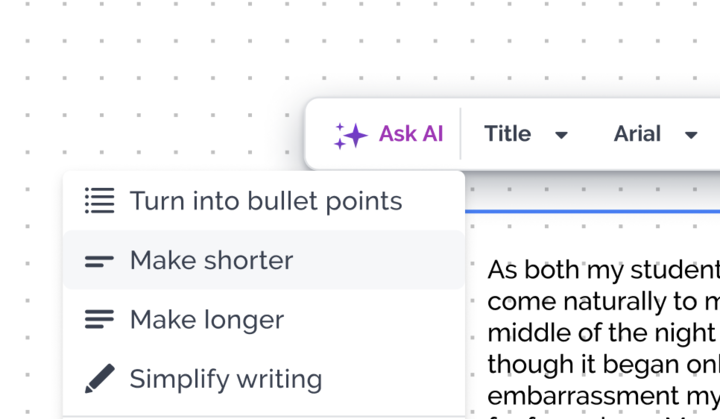
From there, the editing experience makes refinement effortless. Prezi AI’s text enhancement and tone adjustment tools let you sharpen each agenda item to match your voice — whether you need the formality of a boardroom pitch or the energy of a team kickoff. AI-generated visuals and design themes can be applied in seconds, giving your agenda slide the kind of polished, on-brand look that would otherwise require a designer.
What truly sets Prezi apart, though, is its signature zooming canvas. Rather than presenting your agenda as a static list, Prezi lets you build it as a visual map, one that you can literally zoom into during your presentation to transition seamlessly from the overview to each section. It’s a dynamic way to open your talk that signals to your audience: this isn’t going to be another forgettable slide deck.
For anyone who wants an agenda slide that does real work, one that’s customized to their content, visually compelling, and built to engage from the first moment, Prezi AI is the clear choice.
Microsoft PowerPoint: The classic choice
Microsoft PowerPoint remains a go-to for many when it comes to presentations, and it’s perfectly capable of producing clear, effective agenda slides. You can easily build your agenda by adding a title and then listing your key topics. If you’ve already structured your presentation content in an outline view, you can often copy these items directly, which is a nice time-saver.
A particularly handy feature is the ability to link each agenda item to its corresponding slide. This creates an interactive roadmap, allowing for quick jumps to different sections during your talk. It’s great if you need to revisit a point or if your audience has questions about a specific topic later on. While it’s a more traditional tool, PowerPoint offers solid, reliable functionality for a well-organized and professional agenda that clearly sets expectations.
Google Slides: Collaborative and Cloud-Based
If you’re working with a team or simply love the flexibility of accessing your work from anywhere, Google Slides is an excellent option. Its cloud-based nature makes real-time collaboration incredibly smooth, allowing multiple people to contribute to the agenda slide and the overall presentation at the same time. This is fantastic for ensuring everyone is aligned and that the content is always up-to-date, without worrying about version control issues.
Like other robust platforms, Google Slides offers a range of templates that are fully customizable. You can easily adjust colors, fonts, and layouts to tailor your agenda slide to fit your presentation’s specific theme and branding. The ease of sharing and its seamless accessibility across various devices make Google Slides a strong and convenient contender for crafting your agenda, especially for group projects or when you’re on the move.
Canva: Quick and stylish designs
For those who prioritize visual appeal and need to create something beautiful quickly, Canva is a fantastic resource. It’s well-known for its incredibly user-friendly interface and a massive library of design elements, making it simple to create stylish agenda slides even if you don’t consider yourself a designer. You can browse through numerous templates specifically crafted for presentations and customize them to your heart’s content with just a few clicks.
Canva offers a wide variety of these templates that you can easily adapt to produce engaging agenda slides in minutes. This is perfect when you’re on a tight deadline but still want a polished, professional, and visually appealing look. Its intuitive drag-and-drop functionality means you can experiment effortlessly with different layouts, fonts, and graphics until your agenda slide perfectly reflects your presentation’s unique vibe and message.
SlideModel: Professional Templates Galore
If you’re looking for a wide array of professionally designed templates, especially for PowerPoint, SlideModel.com is a valuable resource worth checking out. They offer an extensive collection of customizable agenda templates that cater to various professional styles and specific industry needs. Whether you need a simple, clean bullet-point list for a formal report or a more visually intricate design for a creative pitch, you’re likely to find something that fits the bill.
These templates are specifically designed to save you significant time and effort while ensuring your agenda slide looks polished and maintains a high standard of professionalism. Using one of their pre-designed templates can give you a fantastic starting point, allowing you to focus more on the content of your agenda items rather than spending too much time on the design details from scratch. It’s a great option for achieving consistently high-quality visuals with less fuss.
Create agenda slides that set the tone for success
Your agenda slide is more than a list; it’s the first impression your audience gets of how you think, how you communicate, and how much you respect their time. When it’s done well, it builds trust before you’ve said a word. When it’s done poorly, it signals a long hour ahead.
The good news is that crafting a genuinely effective agenda slide isn’t complicated. It comes down to a handful of principles: keep it focused and clear, organize it so the logic is obvious, give it visual structure that guides the eye, and design it in a way that feels consistent with the rest of your presentation. Avoid the common traps of clutter, vague titles, and mismatched design, and you’ll already be ahead of most presenters.
And with tools like Prezi AI, you don’t have to figure all of this out from scratch. The heavy lifting like the structure, sequencing, design, visual flow, can be handled intelligently and in seconds, leaving you free to focus on delivering your message with confidence. Because the best agenda slide isn’t the one that took the most effort to build. It’s the one that makes your audience lean forward and think: this is going to be worth my time.
Frequently Asked Questions
Why bother with an agenda slide? Can’t I just tell people what I’m going to talk about? You absolutely could just tell them, but an agenda slide does so much more. Think of it as your presentation’s welcome mat and roadmap all in one.
What’s the most common slip-up you see with agenda slides? One of the biggest missteps I often see is cramming way too much information onto the agenda. It’s meant to be a high-level overview, not a super detailed summary of every single point you’ll make. When it’s too crowded, it becomes overwhelming rather than helpful. Aim for clarity and conciseness with your main topics.
My agenda slides always look so boring. How can I make them more interesting? I totally get that! To liven things up, try incorporating simple visuals like icons next to each topic – they can add a nice touch without being distracting. Also, pay attention to your layout. Using white space effectively, choosing readable fonts, and sticking to a cohesive color scheme can make a huge difference in making your agenda look polished and inviting rather than just a plain list.
Is it really necessary to include timings for each section on the agenda slide? While not always mandatory for every single presentation, including estimated timings is a really thoughtful touch, especially for longer sessions. It helps your audience understand the flow and reassures them that you’ve planned the time well. It also helps you, as the presenter, stay on track. If it feels too rigid for your style, at least have a personal time plan for each section.
I’m not a designer. What’s the easiest way to create an agenda slide that still looks professional? You don’t need to be a design whiz! With a tool like Prezi AI, it automatically generates a designed agenda slide for you based on your uploaded content or prompts.