Rachel Wells
December 04, 2025
A corporate trainer walks into a company’s office.
A founder walks into an investor meeting.
A manager walks into a team meeting.
Different rooms, but ultimately the same goal: to move an audience towards an action.
Every effective teacher, record-breaking salesperson, or successful leader shares this same skill. They’re able to move people from understanding and logic to acting on that logic, even if it’s something they would’ve never considered doing before.
Whether you’re explaining a new concept to a team in a corporate training or classroom setting, presenting a strategy to investors and other senior leadership team members, or simply trying to rally a team behind a vision, you’ll need to learn pretty quickly how to accomplish your goal effectively and gain buy-in.
At the heart of the delivery of every powerful message lies a handful of core ingredients that transform your messaging and make it dynamic. Yet, unfortunately, most of us still communicate as if information alone is enough.
It simply isn’t.

Attention (especially online) is fragmented, emotions drive decisions, and stories shape memory. To move people today, you need more than a few well-chosen words. You need to strategically leverage structure, visual flow, and mix in a little bit of audience psychology. And in this article, I’ll show you exactly how to achieve this. You’ll learn more about audience psychology and how to get investors, potential clients, training participants/students, and even difficult stakeholders on board with your idea.
How AI in communication improves persuasive presentations
That’s where artificial intelligence can be especially helpful. When AI in communication is used the right way, such as with tools like Prezi AI, you can engineer your teaching, pitching, and selling presentations in such a way that perspectives will dramatically change, and the desired outcome (the audience taking action) will follow.
Every time you teach, pitch, or lead, you’re negotiating with the human brain. And the human brain, as it turns out, has two operating systems.
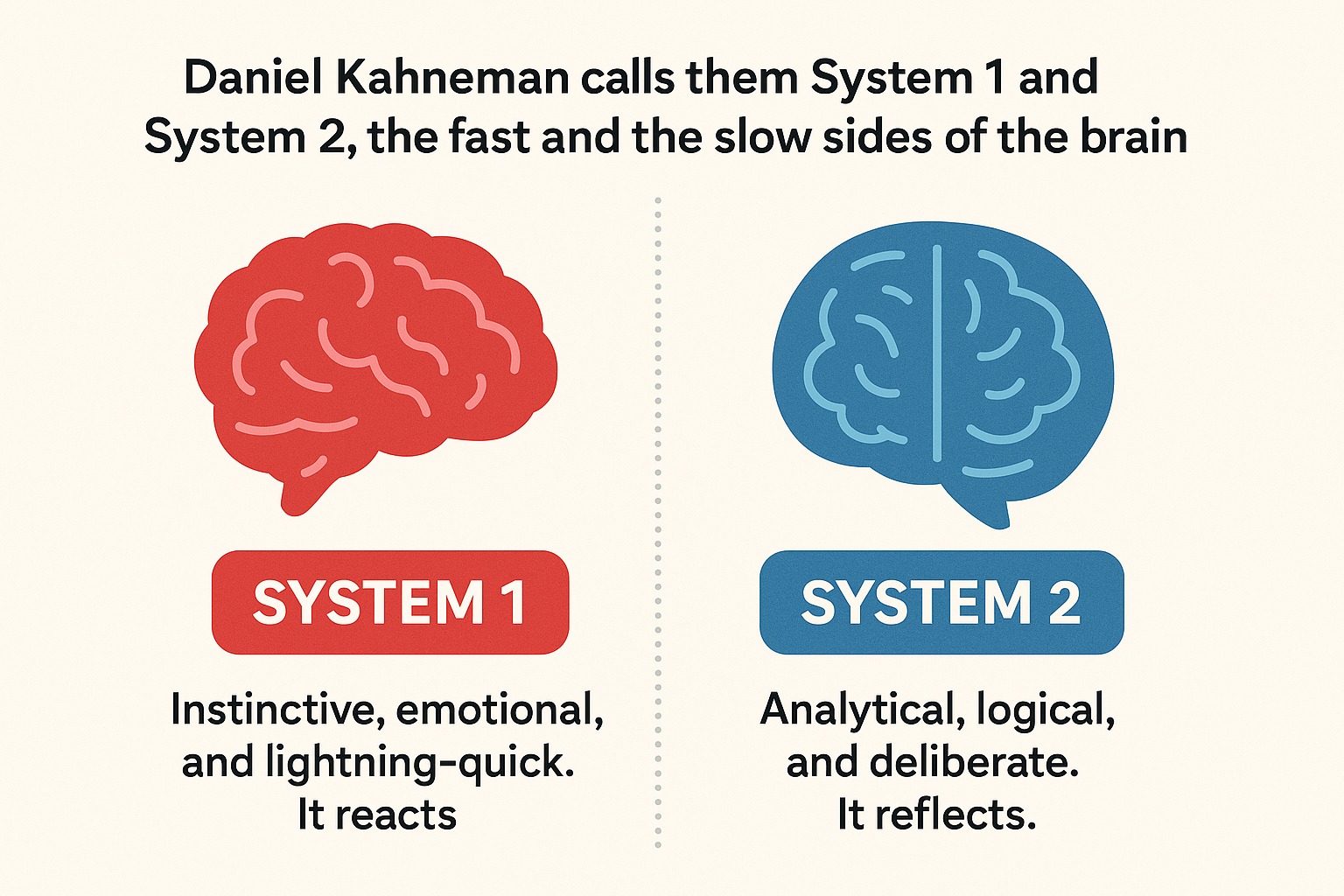
Daniel Kahneman calls them System 1 and System 2, the fast and the slow sides of the brain.
- System 1 is instinctive, emotional, and lightning-quick. It reacts.
- System 2 is analytical, logical, and deliberate. It reflects.
As an exceptional communicator, you’ll know exactly how to speak to both. You’ll capture emotion, or “pathos,” first, then satisfy logic or “logos” after.
When I first started attending training presentations at the beginning of my career, I noticed that nearly every facilitator or business manager would focus almost exclusively on logic: “Here’s the data. Here’s the argument. Here’s the proof.” You’ve likely seen this pattern as well.
It’s the old-fashioned way of presenting, pitching, and educating. But unfortunately, charts and data alone don’t move people.
I recall one time, sitting in a meeting where I was receiving leadership training, ironically on communication skills, with 40 slides of graphs and metrics. Before we were halfway through, the facilitator realized she had lost us. Not because the data wasn’t strong, but because we didn’t feel anything, and the way it was presented completely overwhelmed any remaining energy we would’ve given to taking action.
Did I later recall what was said in that meeting? Hardly. Did it influence my decisions after the meeting? Not much. I just kept on going with my day as usual, quite relieved that it was all over.
That’s when I learned one of the most invaluable lessons about the art of persuasion:
There’s a science to getting a “yes.”
The science behind the “yes”
Robert Cialdini, one of the leading researchers on influence, discovered six principles that guide whether or not people say “yes”:
- Reciprocity
- Consistency
- Social proof
- Liking
- Authority
- Scarcity
When you think about it, these same principles appear in every great presentation, sermon, or lecture you’ve ever heard, and are the foundation of persuasive presentations in our AI-driven workplaces.

Below, you’ll learn how to use AI in communication to guide you through these six principles:
Building persuasive presentations with Prezi AI
- Reciprocity: We’re wired to respond to generosity.
When you give value first, be it an insight, framework, or a story that helps your audience solve something, people naturally want to give back their time, attention, or buy-in.
AI can help you create that upfront value. I often use ChatGPT to help me generate “free takeaways” from my own material, such as a visual checklist or a follow-up email (with a Prezi presentation link) that distills my main points. The moment your audience feels you’ve given them something useful, they lean in.
- Consistency: This is all about ensuring you stay aligned with your own message.
If your words say one thing, but your visuals, tone, or structure say another, persuasion breaks down. For example, if you’re pitching a creative concept but presenting it in a rigid, corporate slide deck, the message and the medium clash, and the audience will feel it.
That’s where using AI for presentations helps you keep our story honest and coherent.
For instance, when I experimented with Prezi AI and used it to create a slide deck for a corporate leadership training masterclass (which is my area of expertise) it instantly gave me the polished “leadership look” I was expecting, almost like the visual design you’d expect in an MBA degree program.
But when I changed the prompt and made it focused on creative services that would be pitched to a start-up, the design remained consistent with the message. It used brighter colors, played with color and design psychology to make it look innovative and creative, and aligned the design with the narrative.
- Social Proof: We’re more likely to believe when we see others already convinced.
This is one of the easiest principles to reinforce visually. AI can pull real-world examples, testimonials, or stats to show momentum, so you don’t look like you’re pulling meaningless claims.
For example, I like to layer in visuals of recognizable logos or brief case-study clips directly inside a Prezi flow. However, as with anything AI-generated, always be careful to verify and sense-check what is provided as “proof” for accuracy, or this could damage your career and destroy trust and credibility.
- Liking: We say yes to people we feel connected to.
AI can help you find that connection point. With AI-powered audience insight tools (like Profound for AI search tracking, or Prezi’s audience insights analytics tool that tells you how your prospective client is engaging with your presentation), you can tailor stories and analogies that match the language, industry, or interests of the people you’re speaking to.
- Authority: We trust those who sound credible and composed.
Prezi AI strengthens authority visually by aligning color, structure, and flow in a way that looks confident and cohesive. It can sense the intent behind your presentation, and even if design isn’t your strength, Prezi AI ensures your presentation looks like it came from a professional studio. And perception matters: clean design communicates competence before you even say anything.
- Scarcity: People pay attention when they sense something rare or time-sensitive.
This is used quite a bit in sales psychology: “Order now while stocks last.” “Reserve your seat now while there are 10 spots left.” Scarcity amplifies the value of your message.
When I use AI to build presentations, I’ll often ask it to highlight what’s unique about a message — the limited opportunity, the new insight, the “window” that’s closing. Prezi AI can help you emphasize that visually by zooming into a single focal point, making your message feel urgent and memorable without feeling too pushy.
When you understand the factors that lead to someone giving you a “yes,” AI helps you make presentations faster, and smarter through appealing to the psychology behind persuasion.
As you saw from the examples I listed above,
- With personalization, AI can adapt tone and examples to your audience, which instantly triggers liking through relatability, and knocks down their barriers.
- By surfacing relevant data and citations, AI strengthens authority so your message feels backed by substance, not opinion. This makes your offer almost impossible to refuse or ignore.
- Through pattern recognition, Prezi AI has already identified what’s resonating across millions of presentations, so you can confidently present while knowing what kind of structure or story arc is best effective for your intended audience.
Most presentation tools ask you to fit your ideas into a fixed layout or template. Prezi AI flips that model completely.
It starts with your intention — What are you trying to make your audience think, feel, or do? — and then designs around that. Instead of forcing your story into pre-designed slides that don’t feel natural, it builds a visual path that mirrors how the brain absorbs information spatially, experientially, and emotionally.
Research quoted by MIT Sloan Management Review shows that 90% of information transmitted to the brain is visual. We also know that visual storytelling improves recall by up to 65%. So, when your message moves, literally, your audience remembers more.
AI sharpens your ability to speak to the mind and the emotion at the same time.
Now, let’s take this a little deeper and learn exactly what it looks like in practice to teach, pitch, and persuade, using AI for effective presentations in each use case.
Teaching with AI tools
Teaching and learning with AI tools like Prezi AI helps educators to personalize content and keep students engaged.

When I first started teaching (not as a traditional teacher but within the context of my university and college workshops when invited as a guest expert), I wrongly assumed that the secret to great instruction was energy and passion. Surely, if you talk with passion and explain clearly, your students will follow. But after a little while, I realized enthusiasm alone doesn’t guarantee understanding. Some learners still drifted or remembered only fragments.
But recently, I discovered something called Bloom’s 2 Sigma Problem, a decades-old study by educational psychologist Benjamin Bloom. He found that students who received personalized tutoring performed two standard deviations better than those in traditional classrooms. In plain terms, they didn’t only learn faster, but they mastered content that others struggled to grasp.
The takeaway here is that personalization transforms learning.
And that’s exactly what AI is now making possible for everyone. You can accomplish this personalization much easier and faster than you could years ago when Bloom’s theory came out.
Today’s educators and trainers need to know how to use AI to amplify their voice and presentation materials. This is the future of learning, and we’re already seeing the results in L&D (learning and development) STAT Instead of creating one rigid version of a lesson, AI tools enable trainers and educators to adapt to how learners respond, which, as we’ve already covered, is visually, emotionally, and cognitively.
- If a concept feels abstract, AI can instantly suggest real-world analogies.
- If attention is at risk of dipping, AI can propose a story hook or interactive question to bring energy back into the room.
- If learners need reinforcement, AI can space out reviews using principles like retrieval practice and spaced repetition, which are two of the most evidence-based strategies for long-term memory.
Studies show that retrieval practice — simply recalling what you’ve learned — strengthens retention more than rereading or rewatching. When combined with spaced repetition, where content reappears over time instead of all at once, the results compound and you’re able to wire it into memory.
And then there’s dual coding theory, which explains why pairing visuals with language dramatically increases recall.
We don’t just hear stories. We see them.
That’s why Prezi’s cinematic, zooming format feels so intuitive for learning, because it mimics how the brain stores and retrieves knowledge spatially.
Designing learning that moves
This is where Prezi AI becomes the teacher’s creative partner.
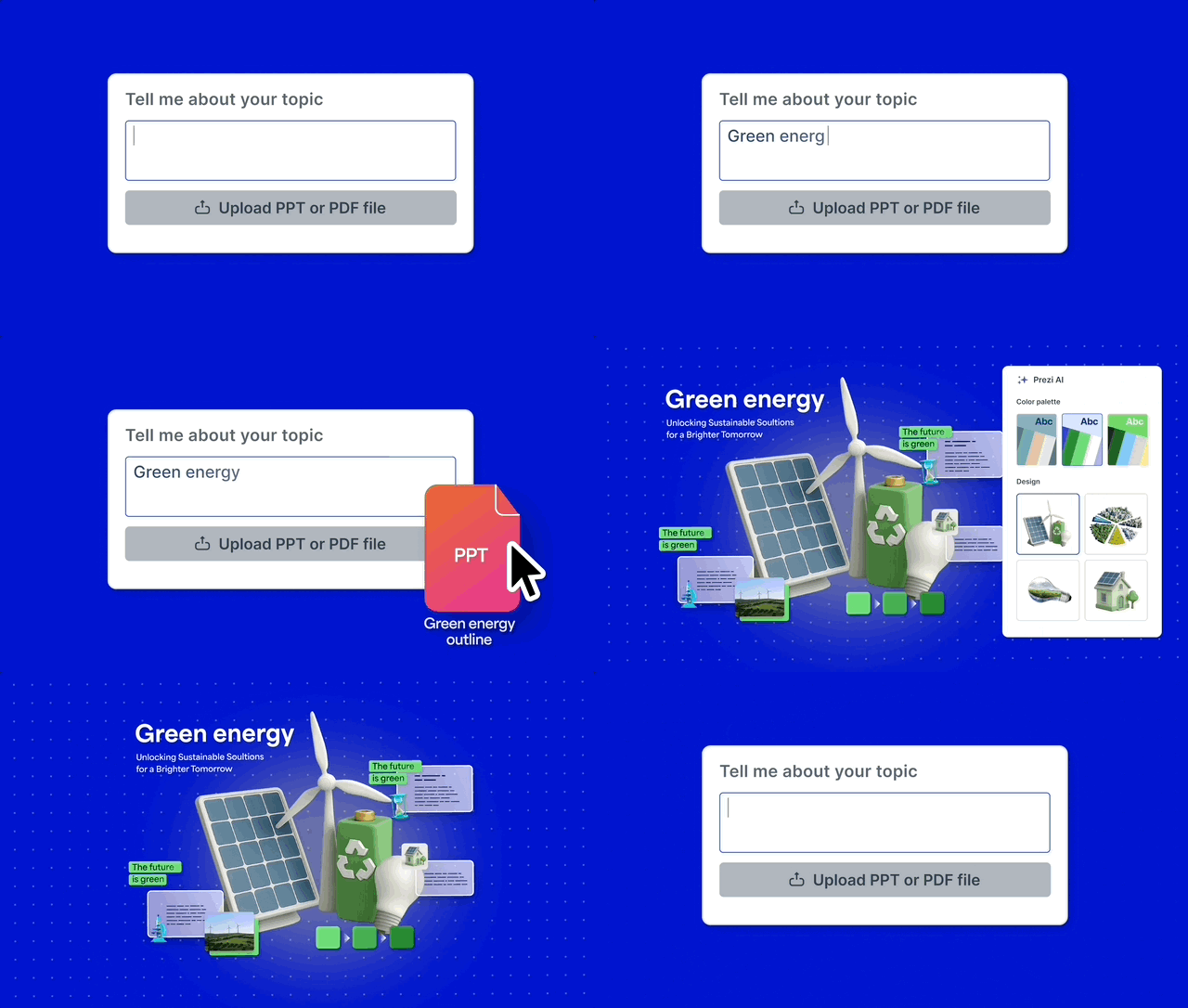
Instead of fighting with slide layouts or worrying about design, you can start with what you want your students to remember, the “yes” that you’re hoping to achieve, and let Prezi AI design the most engaging way to deliver it.
For example, if you type a paragraph explaining market segmentation or sales psychology, within a couple of minutes, Prezi AI maps out a visual hierarchy of how concepts should flow, which ones should stand out, and where transitions should occur to sustain attention.
5 AI-powered teaching prompts to try now
Prezi AI has a ChatGPT-powered bot that you can interact with as you shape your presentation. The next time you log into Prezi, use these prompts to make your lessons smarter, faster, and more memorable:
- Summarize complex concepts visually:
“Explain [topic] using a simple flow that shows cause, effect, and outcome.” - Generate relatable analogies:
“Give me three analogies for [concept] that would resonate with graduate students.” - Draft quiz questions or comprehension checks:
“Create five short-answer questions that test understanding of [topic].” - Create story-based examples:
“Turn this explanation into a short narrative or real-life scenario within the context of [name the role or function that your audience consists of, i.e. managers or sales reps] to make it stick.” - Suggest visual metaphors:
“What’s a visual metaphor that captures the essence of [idea] in one image?”
These small AI collaborations save time while keeping your creative energy focused on what matters.
The 3C model of AI-assisted teaching
I’ve come to think of teaching with AI as a simple, three-part framework: Capture, Clarify, Connect. Let me explain:
- Capture attention – Start strong. Use AI to craft motion, novelty, or surprise. Attention is the doorway to learning. Without it, even great content fails to resonate.
- Clarify concepts – Use AI to break down complex ideas into structured visuals or step-by-step narratives. This removes friction between what you say and what they see.
- Connect emotionally – Anchor facts in feeling. Ask AI to help you find human-centered stories, sensory language, or visual metaphors that make abstract ideas memorable. You’ll see precisely why this is so essential in my last Prezi blog, “How to create memorable presentations.”
When I think back to the educational presentations and speeches that made me part with the money in my bank or moved me to some other action I wouldn’t have taken otherwise, they usually had a mix of these three C’s to a greater or less degree.

AI in education and communication is converging, helping teachers, leaders, and professionals share ideas that resonate across different levels of stakeholders, and professionals with varying backgrounds and industries.
Partner with AI to teach, and you achieve your learning objectives much faster.
How to pitch with AI
I’ve sat through enough pitches to know when a room is lost. The moment you see eyes drop to phones or hear the quiet shuffle of chairs, you know you’ve already lost them, and what’s at least halfway reassuring is that oftentimes it has nothing to do with your idea. It’s usually how you told the story.
When I began pitching my own projects years ago, I made the same mistake everyone makes: I led with logic. I crammed every fact into a deck or document, hoping information alone would seal the deal. But people don’t invest in facts; they invest in belief.
That was the turning point for me: realizing that pitching is less about my audience’s brain downloading data and more about designing emotion around data.
Using AI for presentations: faster, smarter, more memorable
Most of us think of AI as a tool that saves time, a faster way to write or design. But in pitching, AI is capable of doing something far more powerful: it gives you perspective. It helps you step outside your own idea and see it through your audience’s eyes.
Before AI, creating a compelling pitch took weeks of trial and error. You’d experiment with structure, tone, visuals, and flow, mostly guessing what would resonate. Now, with tools like Prezi AI, you can instantly generate multiple narrative structures based on your content and your goal, whether that’s winning investors, securing buy-in from leadership, or landing a client.
Prezi AI is literally trained on millions of real presentations, so it knows best how to go about capturing attention.
AI also eliminates what I call the “slide trap.” Traditional slide decks force your story into a top-to-bottom structure. Fine for basic reporting, but terrible for storytelling. Prezi AI replaces that with a cinematic flow, a story that moves spatially, rhythmically, and visually so that you’re guiding your audience through an unfolding narrative.
And neuroscience backs this up: research shows that when information is presented visually and interactively, comprehension and emotional engagement increase dramatically.
The 5-part AI-powered pitch formula
Here’s a 5-part AI-powered pitch formula that you can use in Prezi AI or any AI tool that helps you plan your narrative.
- Context – Set the scene.
Start by grounding your audience in the problem or opportunity. Ask AI to summarize the world around your idea: the pain point, the trend, the urgency. When Prezi AI visualizes this step, it can literally zoom out — showing your idea within its bigger landscape.
Another critical aspect of context is persona prompting. Persona prompting is where you instruct a Gen AI tool (like Prezi AI or ChatGPT) to adopt a specific persona. This improves the output and increases accuracy. It also helps you to virtually step into the mindset and perspectives of decision-makers, stakeholders, customers, etc., and consider how your actions might be perceived by others. This is great for product and project managers, as you can imagine, but is relevant in any context where you’d need to pitch, like if you’re a founder or senior business leader pitching as part of a fundraising round, for example.
- Conflict – Create tension.
Every great pitch needs friction. What’s broken? What’s being missed? What’s costing people time, money, or peace of mind? This feeds into the first part, “context.” If you’re pitching investors, you’ll know that they’re looking for this all the time. Paul Graham’s (from Y Combinator) advice for founders when pitching investors is “The only thing worth talking about first is the problem you’re trying to solve and why it’s important.”
AI can help you phrase this as an emotional hook. For example, a prompt like “Show me three ways to make this problem feel urgent to a skeptical audience” could be incredibly useful in this instance.
- Concept – Introduce your solution.
Here’s where AI shines. Once you feed it your idea, it can help you structure your story visually, highlighting the before, the breakthrough, and the transformation. Prezi AI builds that transformation into a visual journey instead of just bullet points. - Credibility – Prove it.
AI can pull supporting data, testimonials, and visual evidence that make your claim feel grounded. But, a big but…be careful that you’re not quoting scientific or legal data or making claims that don’t actually exist.
(Look at the recent $240,000 cost from the Deloitte fallout after they used AI to generate their audit report for the Australian government, as an example of how this could go wrong.)
- Call to Action (CTA)
Finally, don’t end your pitch abruptly without a CTA. Otherwise, you’re leaving money on the table. Ask AI to help you phrase your call-to-action as a shared vision rather than a request. “Imagine if…” statements work beautifully here. In Prezi AI, you can finish with a zoom-in moment, like a single image or phrase that crystallizes the emotional “why.”
This is the same structure I use in my partnership proposal meetings whenever I pitch and onboard new clients. It gets their wheels turning so they actually begin to see the value of working with me, and nine times out of 10, the answer is a yes.
(Top tip: Did you know you could even try this approach in a job interview when asked to deliver a presentation as part of a senior management-level interview?)
How to design a memorable pitch/persuasive presentation with Prezi AI
A memorable moment is that single image, phrase, or transition that stays with your audience long after the meeting ends. It’s what psychologists call the picture superiority effect, which is when the brain remembers visuals far longer than text.
Prezi AI helps you design those moments intentionally. It studies your script, identifies the emotional peak, and designs a spatial transition that locks it in memory.
For example, when I created a presentation on the concept of “unlocking hidden potential,” Prezi AI animated the story, making the visual of a key and door lock front and center. The entire presentation had a shadowy, intriguing, almost medieval door appeal, and the front, intro slide was shaped like a keyhole.
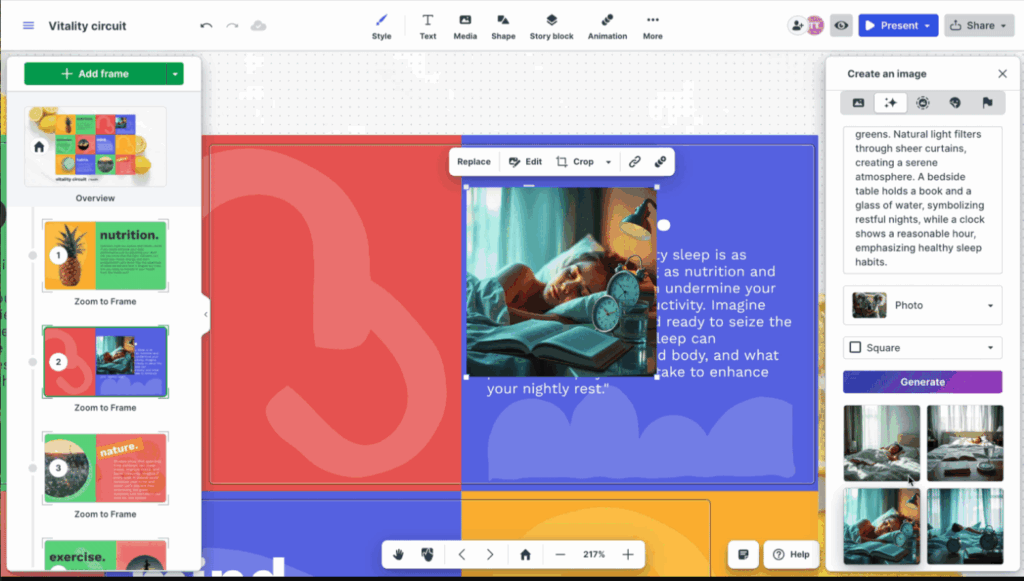
(Prezi also has a new feature that allows you to generate an AI-created photo, in case you can’t find the graphics or photos you’re looking for in the stock library.)
When you have a society where thousands of pitches are given every minute, the one that’s remembered is the one that wins.
You can’t get AI to pitch for you. But it will sharpen your instincts, shorten your prep time, and supercharge your story.
With Prezi AI, you can design slides that choreograph emotion and structure from the viewpoint or lens of your audience, based on their role and function.
Other ways to use AI to teach, pitch, and persuade
Beyond just making presentations better, AI transforms how we think, plan, and communicate long before we ever open a design tool. Outside of Prezi, I use AI tools like ChatGPT almost like a creative co-pilot in every stage of communication.
If I’m teaching, I’ll ask AI to generate analogies, case studies, or deep comprehension questions that challenge learners to think deeply. It helps me design modules in ways that adapt to different learning styles — visual, auditory, and kinesthetic, when this used to take hours.
When I’m pitching, I use AI to analyze my audience. I’ll ask it to summarize their pain points based on their industry or role, then adjust my examples accordingly. This keeps me grounded in what matters to them, not just what excites me.
And when it comes to persuasion, AI helps me find the right angle and tone. I’ll feed it a paragraph and ask, “Does this sound confident yet approachable?” or “Where might this lose its impact?” This way, AI amplifies and refines my intuition.
The goal isn’t to sound robotic or overly polished, because at the end of the day, it’s OK to be human and let your human side show when you’re presenting. The goal is to use AI as a mirror that reflects your message back to you, clearer, sharper, and more emotionally aligned with your audience.
Key takeaways
If there’s one thing this new era of communication has made clear, it’s that AI cannot replace our ability to communicate and persuade. Rather, when used correctly, it’s redefining how we approach it. Teaching, pitching, and leading are all about designing movement, of thought, emotion, and memory, leading to action, to that “yes” moment you’ve been hoping for, and AI can design it using psychology, faster than you could with manual effort.
Here’s a quick summary of what we’ve learned so far:
- AI amplifies clarity, empathy, and memory.
It helps you explain complex ideas clearly, tailor your tone to your audience, and create messages that stick. - Visual cinematic storytelling beats linear slides.
The human brain remembers stories told through motion versus boring, static bullet points. Prezi’s spatial design is built on this principle. - Persuasion = emotion + structure + motion.
The most influential communicators know how to inform and choreograph energy to move people toward action. - Prezi AI bridges all three.
It’s the well-informed designer by your side, turning static content into dynamic storytelling that people actually remember and will act on.
So, what should you do next?
If you’re ready to transform how you teach, pitch, and persuade, start simple. These small actions will help you experience the difference AI-powered storytelling makes (thank me later):
- Try Prezi AI for teaching or pitching your ideas.
Upload your existing content and let the AI reorganize it visually. Notice how it automatically builds story rhythm and hierarchy for you. Or, start from scratch, a blank canvas of nothing, just your initial outline of a vague idea, and watch it construct a stellar, persuasive presentation. - Ask ChatGPT or Prezi AI for a story arc.
Combine human insight with AI structure. This pre-thinking stage will make your presentation flow effortlessly once you visualize it.
The future of persuasion and communication with AI will be owned by trainers, educators, presenters, founders, leaders, and even content experts, who can blend data, design, and emotion seamlessly.
Start your 14-day free trial of Prezi AI and see what it’s like to have the world’s best designer by your side–one that understands not just what you want to say, but how to make people feel it.
FAQs
1. How can AI make me a better teacher or trainer?
AI helps you personalize lessons, simplify complex topics, and create visuals that match how people actually learn. Tools like Prezi AI use principles from cognitive science to turn information into motion and story. You spend less time designing slides and more time connecting with your students.
2. How can AI improve my business pitch or presentation?
AI helps you structure your story, clarify your message, and visualize your key points in ways that resonate emotionally. Instead of guessing what might capture attention and lead to action (like closing an investment round or finalizing a paid partnership), AI tools like Prezi AI analyzes proven presentation patterns and audience behavior.
3. What should I avoid using AI to design my presentation?
The most common mistake is over-automation, which is where you let AI do the thinking instead of the refining. AI should amplify your voice, not replace it. Always infuse your personality, empathy, and experience into what the AI generates. Your audience connects with your authenticity first.
4. What’s the best AI tool for teaching, pitching, and persuasion?
There’s no single “best” tool. It honestly depends on what you’re creating. Prezi AI is ideal for visual storytelling and engaging presentations; ChatGPT excels at brainstorming ideas and refining tone; and Notion AI can help with structuring and summarizing information. The most powerful results sometimes come when you combine them into your own toolkit, using each to do what it does best.