Naba Ahmed
December 10, 2025
Artificial intelligence is changing how we create presentations, but not all AI is the same. When you look at Beautiful.ai vs. Prezi, you see two very different ways AI can support your workflow. Beautiful.ai’s AI acts as a design assistant, automatically adjusting layouts and enforcing best practices on a slide-by-slide basis. Its focus is on making sure every element looks clean and professional. Prezi AI takes a broader approach, acting as your creative partner. From a single prompt, it can generate an entire, fully designed presentation with a compelling narrative structure and dynamic flow. It helps you brainstorm and build a complete presentation, and not just format slides.

What are the main differences between Beautiful.ai and Prezi AI?
Choosing the right presentation software can feel like a big decision, but it really comes down to what you want to achieve. Both Beautiful.ai and Prezi can help you create compelling presentations, but they go about it in fundamentally different ways. Beautiful.ai focuses on using AI to enforce design rules for a polished, traditional slide deck. Prezi, on the other hand, gives you a dynamic presentation that attracts attention, no matter the audience.
To decide which platform is the right fit for your next big presentation, you want to understand their core philosophies on design, features, and user experience. Let’s break down what makes each one unique.
AI-powered design
Both platforms use AI, but for different purposes. The AI in Beautiful.ai functions as a slide-level designer. It helps you build charts, tables, and timelines from your content, applying design best practices automatically.
Prezi takes a broader approach. With Prezi AI, you can generate an entire, fully designed presentation from a single text prompt. It doesn’t just tweak a slide; it helps you brainstorm, structure your narrative, and create a complete visual story with a cohesive look and feel. It’s a partner in the entire creation process, from the initial idea to the final, polished presentation, saving you hours of work.
The user experience
Beautiful.ai strives to have a simple user experience. Its AI-powered engine can generate entire slides, including charts and timelines, based on the content you provide. This makes it an excellent choice if you’re short on time or want to create a clean, corporate-style presentation without much fuss. The interface is clean and intuitive, guiding you through the creation process with helpful constraints that prevent common design mistakes.
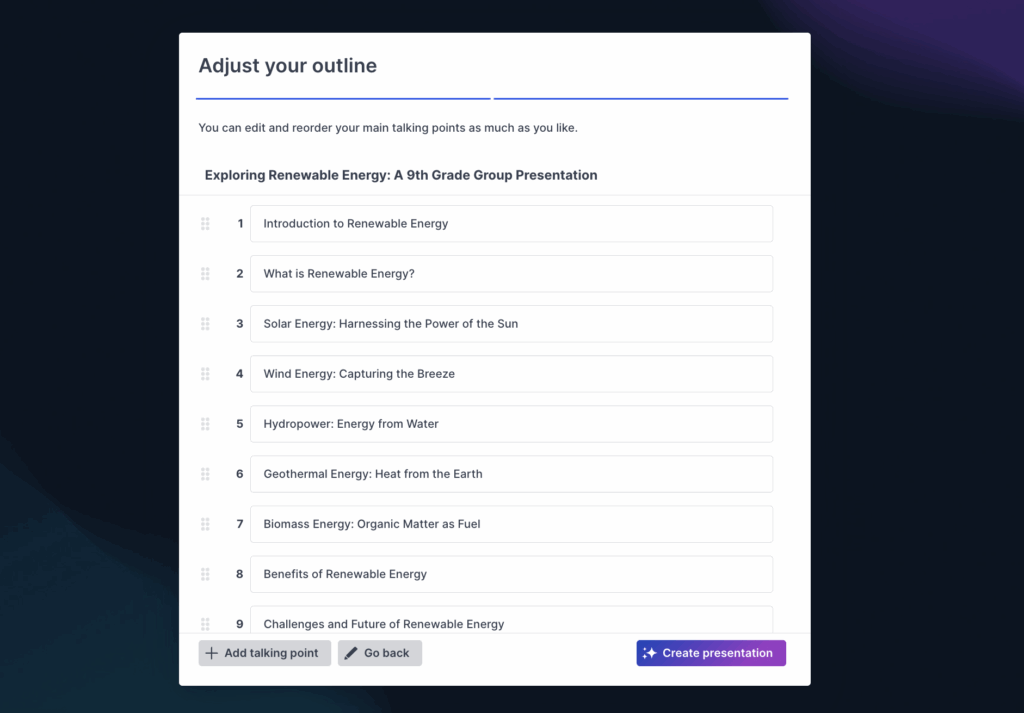
Prezi, on the other hand, offers a user experience centered on dynamic movement and visual storytelling. Its standout features are the impressive zoom and pan animations that create a cinematic feel. When used thoughtfully, this motion helps guide your audience’s attention and makes your message more memorable. Using Prezi AI is very simple. Add a prompt or upload a file (PPT, DOC, or PDF) to generate a presentation. From there, you can review the outline and shift content around even before you head to the editor.
A look at the features: Beautiful.ai vs. Prezi
When you’re choosing a presentation tool, the specific features can make all the difference. Both Prezi and Beautiful.ai have their own unique strengths that cater to different needs and working styles. Let’s break down how they stack up against each other in five key areas so you can see which one aligns best with your goals.
Templates and design flexibility
Beautiful.ai is formed around “smart templates” that automatically adjust the layout as you add content. But, Prezi AI offers more beyond templates. It’s a great Beautiful.AI alternative because Prezi AI will create custom-built presentations for you based on your content or files. Your presentation theme, colors, and layout are fully personalized to your content. This prevents you from having to force content into a limited number of preset templates.
Beautiful.AI can give you a professional-looking presentation without spending much time on design, but the output may not be as customized as you’d like it to be.

Collaboration tool
Working with a team is a big part of creating presentations, and both platforms offer cloud-based collaboration. Beautiful.ai makes it simple for others to view and comment on your work; you can share a link, and they don’t need an account to provide feedback. This makes it easy to get quick feedback from stakeholders who may not use the platform themselves.
Prezi is cloud-based, allowing your work to be accessible anywhere. Everyone on your team will need their own Prezi account, which allows for real-time co-editing and a more cohesive workflow. This setup is ideal for dedicated teams that frequently work on presentations together. With Prezi for Teams, you can manage permissions and keep your brand assets organized in one place. While your collaborators will need their own Prezi accounts to edit, this ensures everyone has access to the full suite of creative tools and can contribute effectively to the final product.
Animations in these tools
This is where the two tools really show their different philosophies. Beautiful.ai automatically adds clean, simple transitions between slides. In Beautiful.ai, you can adjust the timing and speed, but the animations are more subtle and professional, ensuring a smooth flow from one point to the next.
Prezi’s signature “zoom and reveal” function lets you move around your canvas, zooming in on details and panning out to show the bigger picture. These cinematic transitions are a powerful tool for visual storytelling, helping you create memorable and engaging presentations that capture and hold your audience’s attention. It’s less about moving between slides and more about taking your audience on a visual journey. On top of that, you can add your own animations between slides, similar to the ones in Beautiful.ai.
How to add media to Beautiful.ai and Prezi AI
Both platforms let you enrich your presentations with images, videos, and charts. Beautiful.ai has a library of free stock photos and icons you can easily add to its smart templates.
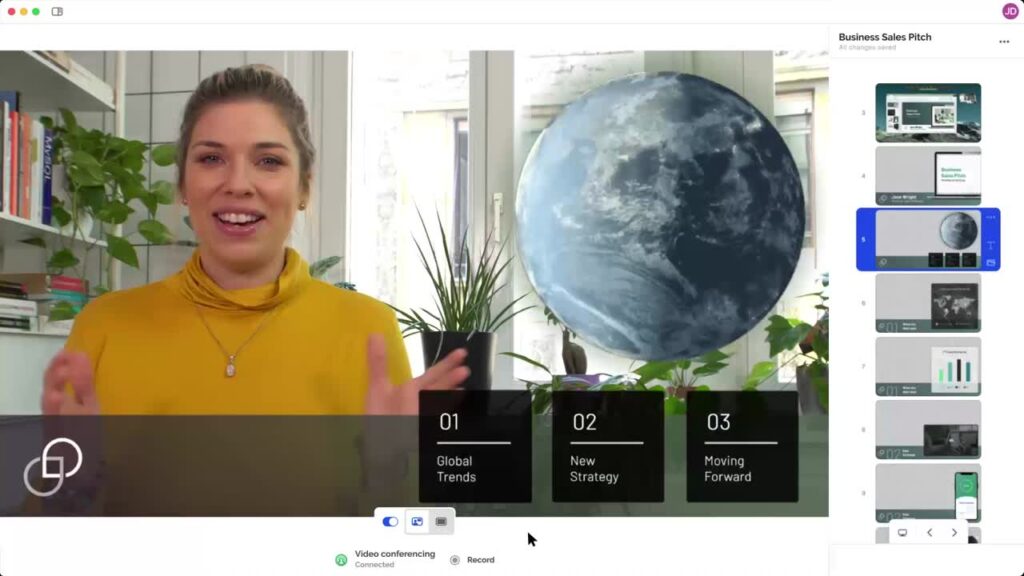
Prezi also allows you to import various media types, but it offers a few extra capabilities. You can convert your old PowerPoint slides directly into a Prezi presentation, which is a huge time-saver if you’re switching tools. Plus, with Prezi Video, you can easily record and embed a video of yourself right alongside your content. This adds a personal touch and is perfect for virtual presentations where you want to maintain a strong connection with your audience.
How to share and export
How you share your final presentation is just as important as how you create it. With Beautiful.ai, you can present online or export your files as a PDF or PowerPoint for offline viewing. This is handy if you need a traditional slide deck.
Prezi is primarily a cloud-based tool, meaning your presentations can easily be shared with a single link. This ensures your dynamic animations and transitions work perfectly every time, no matter the device. While the free version has some limitations on privacy and offline downloads, paid plans give you full control, including the ability to download a standalone version of your presentation that works without an internet connection.
Branding and customization
If you work for a company with strict brand guidelines, this is a key point of comparison. Beautiful.ai excels at brand management, allowing you to lock in your company’s specific fonts, colors, and logos. This ensures that every presentation created by your team remains perfectly on-brand, which is a huge asset for maintaining a consistent corporate identity.
Prezi also offers robust branding features, especially for teams using Prezi for Business. You can create custom templates with your brand colors and logos to ensure consistency. But you don’t need to be part of a team’s plan in order to add in your brand colors. With Prezi AI, you can review the main theme and colors after you drop in your prompt. In that same space, you can upload your logo to pull in your brand colors and make it easy to present in internal meetings and external pitches. Y
Comparing the technical details
Beyond the flashy features and design tools, it’s important to look at the technical side of things. How do these platforms fit into your existing workflow? What can they tell you about your audience? And how do they handle your data? Getting into the nitty-gritty details of compatibility, integrations, analytics, and security will help you figure out which tool is the right long-term partner for your presentation needs. Let’s break down how Beautiful.ai and Prezi stack up in these key areas.
Performance analytics
Ever wonder if anyone actually looked at the presentation you sent? Both platforms offer analytics to give you insight into audience engagement. Beautiful.ai provides tracking that shows you who viewed your presentation and for how long, which is great for getting a general sense of your content’s reach.
Prezi’s analytics go a step further by showing you how your audience interacts with your content. You can see which sections they spent the most time on and where they might have dropped off. This detailed feedback is incredibly valuable for sales teams, educators, and anyone who needs to refine their message based on what resonates most with their viewers.
Security and offline access
Data security is a major consideration, especially for businesses. Prezi and Beautiful.ai are both SOC 2 compliant, which means both meet high industry standards for securely managing customer data. This is a key feature for larger organizations with strict security requirements.
With Prezi, your privacy settings depend on your plan. The free version makes presentations public by default, which is something to keep in mind. However, upgrading to a business plan gives you full privacy controls, password protection, and the ability to download your presentations for offline use with the desktop app. This ensures your sensitive information stays secure while giving you the flexibility to present anywhere, anytime.
Which tool is better for presentation style?
The best presentation tool often comes down to your personal style and what you want your audience to experience. Do you prefer a structured, linear story or a more dynamic, conversational journey? Both Beautiful.ai and Prezi have distinct approaches that cater to different needs, so let’s look at how they stack up based on the way you like to present.
Taking your audience on a journey
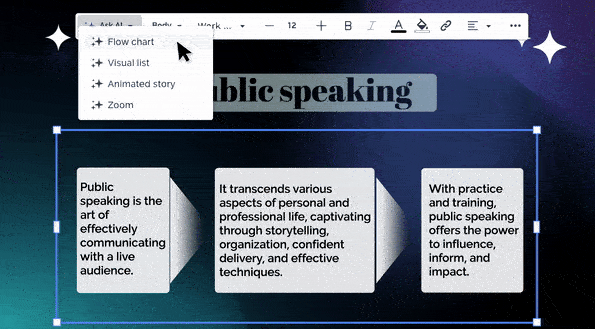
If you think in stories rather than slides, your choice here is critical. Beautiful.ai helps you build a clean, professional narrative slide by slide, ensuring each part is well-designed. It’s great for creating a polished, linear story. Prezi, on the other hand, is built for a different kind of narrative. With Prezi AI, you can move beyond simple slides and create fully designed presentations from just a few core ideas. It helps you transform text into different visual stories, like flow charts and animated paths, making it easier to show the relationship between concepts instead of just telling your audience about them.
Audience engagement features
Both tools offer ways to keep your audience hooked. Beautiful.ai provides sleek, automatic animations and transitions between slides that look polished without any effort. Prezi is known for its signature zoom and pan effects, which can create a “wow” factor and visually guide your audience through your story. For an even deeper level of engagement, Prezi Video lets you appear right alongside your content during a video call or recording. This allows you to interact with your visuals on-screen, creating a broadcast-quality experience that keeps you connected with your audience face-to-face.
Controlling your presentation’s flow
How much control do you want over the narrative path? Beautiful.ai gives you a predictable, controlled flow. The slide-based structure means you move from point A to point B without any surprises, which is perfect for formal reports or structured updates. Prezi offers a more flexible path. You can guide your audience on a set journey or freely explore the canvas. This freedom within Prezi is powerful.
Which AI presentation tool should you use?
Choosing between Prezi and Beautiful.ai really comes down to what you need to accomplish and how you like to work. Both platforms can help you create a great presentation, but they cater to different needs and creative styles. Think about your own comfort level with design, the type of story you want to tell, and how much time you have.
If you’re a design beginner
If the thought of choosing fonts and color palettes makes you nervous, you need a tool that does the heavy lifting for you. For a clean, traditional-looking presentation without the design stress, Beautiful.ai is a safe bet. Its “smart templates” automatically adapt as you add content, ensuring everything looks polished and professional without much effort. However, if you want to create something visually interesting without needing a design degree, Prezi’s AI is better for creating dynamic presentations that will capture attention.
If you’re a creative professional
For creatives, marketers, and anyone who wants to break out of the standard slide-by-slide format, Prezi is the clear winner. The platform’s signature open canvas and zooming transitions allow you to create a memorable journey for your audience, connecting ideas in a way that a linear slideshow just can’t. This is perfect for visual storytelling, mind mapping, and presenting complex information in an intuitive way. If your goal is to make a lasting impression and showcase your ideas with a unique flair, you’ll appreciate the creative freedom Prezi offers. Prezi AI creates personalized presentations that are branded and on theme, making you stand out in team meetings or with prospective clients.
If you’re short on time
Pressed for time? Both tools have features to help you work faster. Beautiful.ai’s restrictive design can speed up the process because it makes many of the design decisions for you. This is helpful for creating simple, professional slides in a hurry. But if you need to create a complete, attention-grabbing presentation from scratch in just a few minutes, Prezi AI is your best bet. By simply entering a prompt, you can generate a fully designed, dynamic presentation with visuals and a narrative flow, saving you hours of work while delivering a more impressive result.
A breakdown of plans and pricing
Let’s talk about the bottom line. Both Prezi and Beautiful.ai offer a range of plans, from free versions for casual users to robust solutions for large organizations. Your budget and specific needs will be the biggest factors in deciding which pricing structure works best for you. It’s not just about the monthly cost, but what you get for your money in terms of features, flexibility, and support.
What you get for free
Both platforms let you get started without opening your wallet. Beautiful.ai’s free plan is quite generous, giving you access to all its core features and templates for up to 200 slides. It’s a solid option if you want to try out their AI-driven design approach. Prezi also offers a free Basic version that lets you create, share, and store your presentations online. You get access to Prezi AI credits, where you can create presentations from a prompt or file, AI-generated images, browse through AI-recommended visuals, remove image backgrounds, and transform text into visual content.
Paid plan options
When you’re ready to commit, both tools have paid tiers with more advanced features. A Pro plan with Beautiful.ai runs about $12 per month and gives you unlimited slides, custom fonts, and viewing analytics. Prezi’s Plus plan is around $19 per month and includes offline access, advanced presenter tools, and privacy controls. A huge plus for our academic users: Prezi offers a significant discount for students and teachers, making its powerful features much more accessible for educational purposes.
Enterprise solutions
If you’re part of a larger organization, you’ll want to look at the enterprise-level plans. Beautiful.ai offers custom pricing for large companies that need advanced security and team management features. Prezi has a dedicated plan, Prezi for Teams, which is built specifically for sales and marketing professionals. It includes powerful tools for collaboration, content management, and tracking engagement data, helping your entire team create consistent, on-brand presentations that get results. This is where you can really standardize your company’s visual storytelling.
Storage and support
Finally, consider how you’ll store and share your work. With Prezi and Beautiful.ai, you can export your presentations as PDFs or PowerPoint files. This is handy for sharing static versions of your slides.
What are the limitations?
No tool is perfect for every single task, and knowing the potential downsides can help you make the best choice for your specific needs. Both Beautiful.ai and Prezi have areas where they shine and others where they might not be the ideal fit. It really comes down to what you’re trying to accomplish with your presentation and how you prefer to work. Let’s look at the potential drawbacks of each platform so you can decide which trade-offs you’re willing to make.
Potential drawbacks of Beautiful.ai
Beautiful.ai is built around a system of smart templates that handle the design for you. While this is fantastic for speed and consistency, it can feel limiting if you have a very specific vision in mind. The main drawback is that you don’t have a ton of creative freedom; you have to work within the rules of the template. If you’re looking to create complex animations or a highly customized design that breaks the mold, you might find the platform’s constraints get in your way. Some users also report that the software can slow down when working with very large, content-heavy presentations, which is something to keep in mind if your work is typically data-intensive.
How do you choose between Beautiful.ai and Prezi?
So, how do you choose? It boils down to your priorities. If your main goal is to create clean, professional-looking slides as quickly as possible, Beautiful.ai is an excellent choice. Its AI does most of the heavy lifting, ensuring a polished result with minimal effort, which is perfect when you’re on a tight deadline.
However, if you want to create a truly dynamic and memorable presentation that stands out, that can also be created just as quickly, Prezi is the superior choice. It’s designed to allow you to build a narrative that flows, taking your audience on a journey. The zooming effects, when used thoughtfully, can create a captivating experience that holds your audience’s attention from start to finish. Try out Prezi AI today.
Frequently Asked Questions
I’m not a designer. Which tool is easier to start with? Both tools are designed to be user-friendly, but they help in different ways. Beautiful.ai is very straightforward because its AI acts like a strict design assistant, locking your content into clean, professional templates. If you want a tool that prevents you from making design mistakes, it’s a great choice. Prezi is also easy to get started with, especially since Prezi AI can generate an entire presentation for you from a simple prompt. It gives you more creative freedom, which is incredibly powerful once you get the hang of the open canvas.
Can I use my company’s branding with these tools? Yes, both platforms offer strong branding capabilities, particularly on their team plans. Beautiful.ai allows you to set specific fonts, colors, and logos that your team can’t deviate from. Prezi also lets you create custom, on-brand presentations by uploading your logo into Prezi AI. The main difference is that Prezi empowers your team to apply that branding within a more dynamic and creative storytelling format, giving you consistency without sacrificing engagement.
Is Beautiful.ai or Prezi better for storytelling? If you want a traditional, linear story, Beautiful.ai supports that well by keeping everything slide-by-slide and polished. If you want a more visual “journey” that shows how ideas connect, Prezi is built for that with its open canvas, zooming transitions, and flexible pathing.
Which platform is better for virtual or remote presentations? While you can share a link to a presentation from either tool, Prezi has a clear advantage for live virtual meetings with Prezi Video. This feature lets you appear on-screen right alongside your visuals, almost like a news broadcast. It’s a fantastic way to maintain a personal connection and keep your audience focused on you and your message, which is something a standard screen-share just can’t replicate.
I need to create a presentation fast. Which one is quicker? This depends on your starting point. If you already have all your content and just need to put it into polished, traditional slides, Beautiful.ai is very fast because its templates handle all the formatting for you. However, if you’re starting with just an idea, Prezi AI is the faster choice. You can give it a simple prompt, and it will generate a complete, visually engaging presentation with a full narrative structure in minutes, saving you hours of brainstorming and design work.
Can I import existing content like PowerPoints or documents? Prezi AI supports starting from a prompt or uploading files (like PPT, DOC, or PDF) and generating a presentation from them, which is especially helpful when repurposing existing material. Beautiful.ai is generally more focused on building slides within its system as you add content.