Naba Ahmed
January 07, 2026
Already have a PowerPoint deck you like, but want it to feel more dynamic and interactive? Good news—you don’t have to start over.
With Prezi Present, you can import your PowerPoint slides and instantly transform them into an interactive, zoomable presentation. Whether you’re building something new or updating an existing Prezi, it’s a fast, flexible way to bring your content to life.
Why bring your PowerPoint presentation into Prezi?
PowerPoint is great for organizing ideas, but Prezi helps you tell the story behind them.
When you import slides into Prezi, they become interactive frames on an open canvas. That means you can:
- Zoom in to highlight key points
- Rearrange content visually (not just slide by slide)
- Mix old slides with new frames, animations, and visuals
- Create a more natural, engaging flow for your audience
And if you want to move even faster, Prezi AI can help you turn your slides into a full presentation in seconds.
Fastest option: Convert your PowerPoint using Prezi AI
Short on time? Prezi AI is the quickest way to go from PPT to a presentation.
Just upload your PowerPoint file, and Prezi AI will:
- Pull in text from your slides
- Create a structured outline
- Add relevant visuals from Prezi’s image gallery
- Apply a cohesive design and color palette
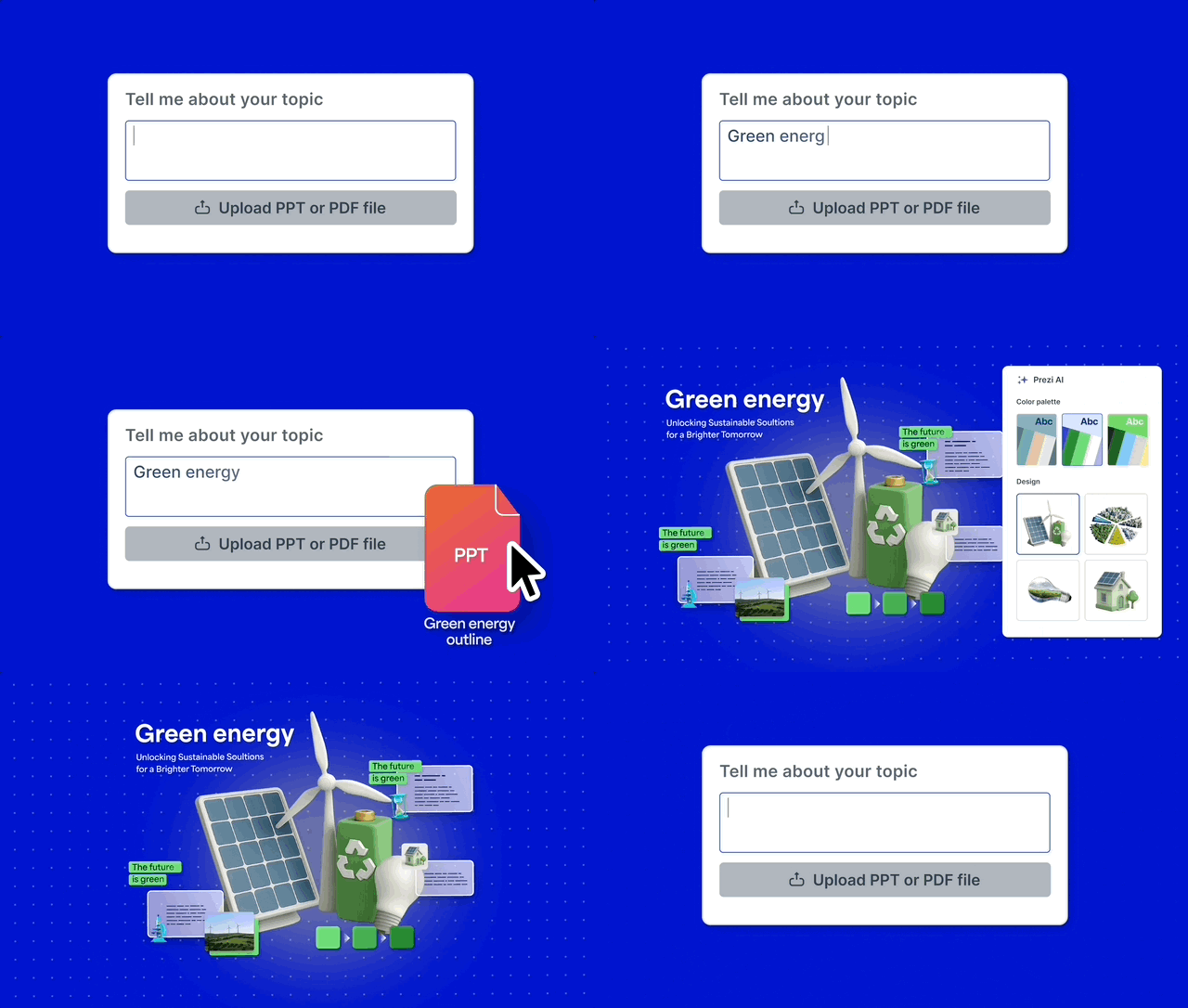
You can review and tweak the outline, shuffle designs, or recreate the presentation if you want a different look. Once it feels right, jump into the editor and customize everything.
Create a new Prezi from your PowerPoint
If you prefer to design things yourself, you can import slides into a brand-new Prezi presentation.
Start by creating a new presentation from a template—or from scratch. In the editor:
- Click Media at the top
- Select PowerPoint and upload your file
- Choose which slides you want to import
Your slides will appear as frames on the canvas, ready to move, resize, rotate, or rearrange however you like.
Already working in Prezi? Add slides to an existing presentation
You can also add PowerPoint slides to a presentation you’re already working on.
Just open your Prezi, go to Media → PowerPoint, upload your file, and insert the slides you need. It’s an easy way to reuse existing content while keeping everything visually consistent.
Customize your slides in Prezi
Once your slides are in Prezi, you can make them your own:
- Move, resize, or rotate slides anywhere on the canvas
- Rearrange the order by dragging thumbnails in the left sidebar
- Hide solid slide backgrounds so content blends into your design
- Remove extra zoom animations by detaching frames
- Add new content like animations, story blocks, charts, videos, or AI-enhanced text
You’re not locked into a slide-by-slide layout. Everything is flexible.
Preview, polish, and share
You can preview your presentation anytime to see how everything flows. Zoom through your frames, adjust the order, and fine-tune the pacing until it feels just right.
The result? A once-static PowerPoint that’s now an interactive Prezi presentation, which is ready to share with your audience.
Transform your PowerPoint with Prezi AI
Whether you want to quickly generate a new presentation or customize every detail yourself, importing your PPT into Prezi gives you a faster, more engaging way to present. With Prezi AI, you can upload your deck, get a polished first draft in seconds, and then make it your own.
Try Prezi AI by importing your PowerPoint deck and see how easy it is to transform static slides into a dynamic, zoomable presentation.