Naba Ahmed
January 28, 2026
Your content needs to do more than just look good—it needs to make an impact. While Visme is widely known for polished, static designs, many creators, educators, and teams are now searching for a Visme alternative that helps them tell stronger stories, move faster, and truly engage their audience.
If your goal is to guide people through complex ideas, create interactive experiences, or deliver presentations that are actually remembered, it’s worth looking beyond traditional slide tools. That’s where Prezi stands out.
In this article, we’ll explore Prezi vs Visme, break down how Prezi works as an AI-powered alternative to Visme, and explain why more users are switching—often starting with a Visme free alternative—and never looking back.
Visme vs Prezi: A difference in philosophy
Visme is often described as a design Swiss Army knife. It allows you to create presentations, infographics, reports, social media graphics, and more—all from one platform. With hundreds of templates and a generous free plan, it’s a strong choice for static visual content.
But sometimes, you don’t need a jack-of-all-trades. You need a specialist.
Prezi was built with one core mission: help people present ideas in a way that captures attention and sticks. Instead of focusing on static slides, Prezi uses a dynamic, zoomable canvas that lets you move naturally between ideas, show relationships, and adapt your presentation in real time.
This difference in approach is what makes Prezi such a compelling Visme alternative.
Prezi vs Visme: Feature-by-feature comparison
When comparing Prezi vs Visme, the contrast becomes clear as soon as you start building a presentation.
AI creation
- Prezi: AI creates a fully contextual, visual, and customizable presentation. It doesn’t just generate slides—it builds a narrative structure designed for storytelling.
- Visme: AI features are more limited and often require manual cleanup and customization.
Presentation focus
- Prezi: Purpose-built for presentations that move and adapt.
- Visme: Templates are more limited for presentations, with a stronger emphasis on static designs.
Ease of Use
- Prezi: Drag-and-drop interface combined with AI assistance means one click can create a finished presentation.
- Visme: Often requires more manual edits, especially for presentations.
Animations and motion
- Prezi: A zooming canvas proven to resonate better with audiences.
- Visme: Primarily static slide experiences.
Live adaptability
- Prezi: Move freely between topics, zoom in on details, or pull back to show the big picture.
- Visme: Linear templates only.
Collaboration
- Prezi: Real-time co-editing designed for teams.
- Visme: More limited team functionality.
Offline access
- Prezi: Present and edit offline.
- Visme: No offline support.
Language support
- Prezi: Create presentations in 9+ languages.
- Visme: English-focused creation.
When you add all this up, it’s easy to see why many users conclude that Prezi beats Visme for presentation-focused work.
AI-Powered Alternative to Visme: How Prezi AI Goes Further
AI is quickly becoming a standard feature in design tools, and both platforms have embraced it. Visme’s AI Design Suite can generate fully designed presentations from minimal input, which is a solid time-saver.
Prezi, however, takes this concept further.
Prezi AI is deeply integrated with its unique storytelling engine. Instead of simply placing content on slides, it builds a conversational narrative on a zoomable canvas. You can type a simple idea or upload an existing presentation, and in seconds, Prezi AI generates a complete, organized, visually engaging presentation—no templates required.
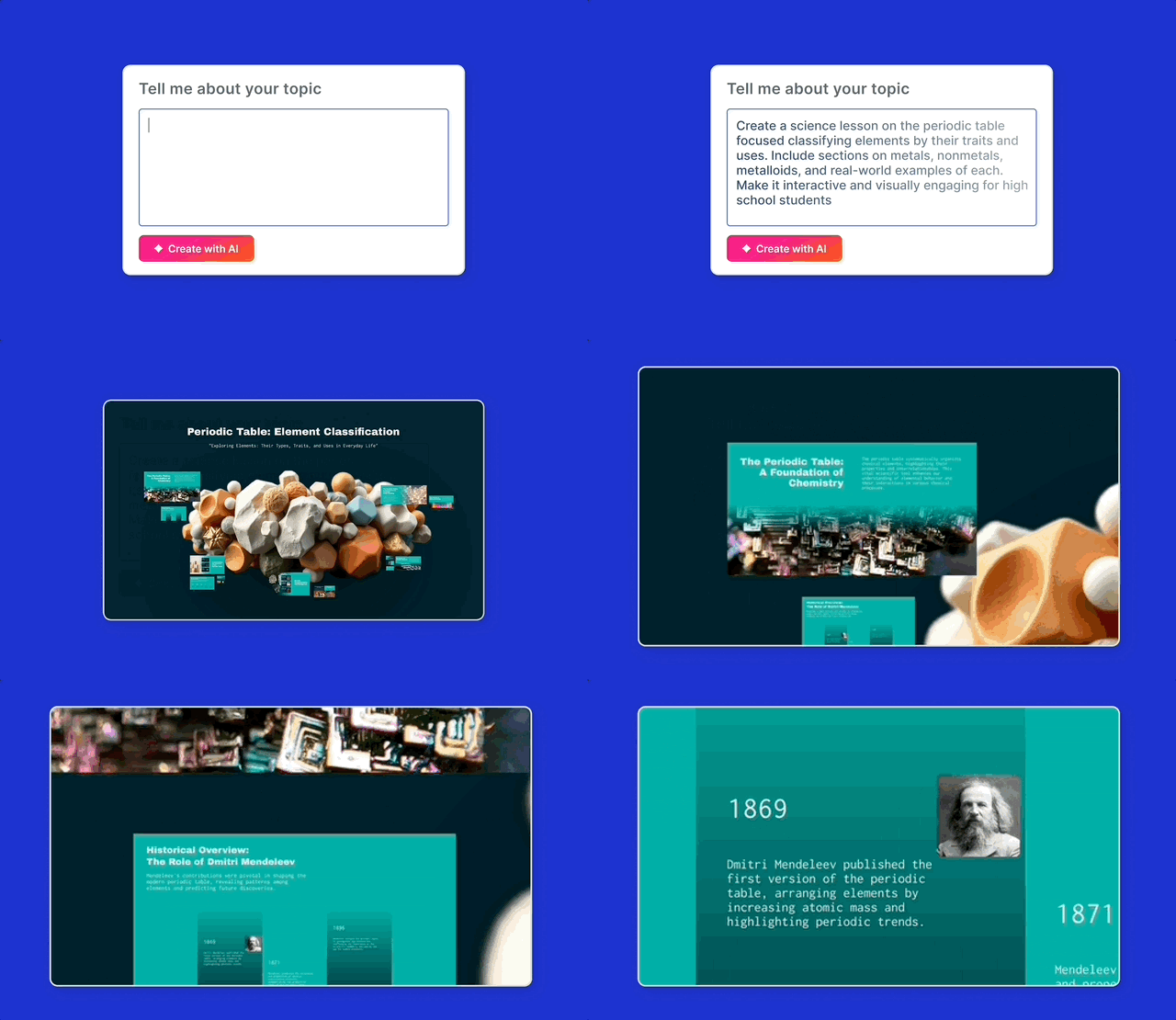
This makes Prezi a powerful AI-powered alternative to Visme, especially for people who need to go from idea to delivery fast without sacrificing clarity or impact.
Create presentations in seconds with Prezi AI
One of the biggest frustrations with traditional tools is how long it takes to get started. Prezi removes that friction.
Upload an existing deck or type a short prompt. Prezi AI instantly creates a custom presentation that’s visual, structured, and ready to impress.
Effortless creation
One click means one finished presentation. Prezi AI understands your topic and designs it instantly—so you spend less time building and more time presenting.
Scientifically proven engagement
Prezi isn’t just about aesthetics. In a university-led blind study, Prezi presentations were:
- 25% more effective
- 22% more persuasive than static presentations.
That means your audience is more likely to remember what you said—and act on it.
Collaboration that actually helps teams
For teams, collaboration needs to feel effortless.
Prezi is built from the ground up for real-time teamwork:
- Live co-editing
- Comments and feedback directly in presentations
- Shared folders to keep everything organized
Prezi also includes brand kits, so colors, fonts, and logos stay consistent—no matter who on the team is creating the presentation or whether it was generated by AI.
For sales and marketing teams, Prezi’s analytics add another layer of value, showing who viewed your presentation and which sections captured the most attention.
Sharing and presenting anywhere
Once your presentation is ready, delivery matters.
Visme offers standard export options, which work well for static assets. Prezi, on the other hand, is optimized for modern presenting:
- Share a simple link anyone can view in a browser
- Present live from anywhere
- Use Prezi Video to appear on screen next to your content for virtual meetings, courses, and video messages
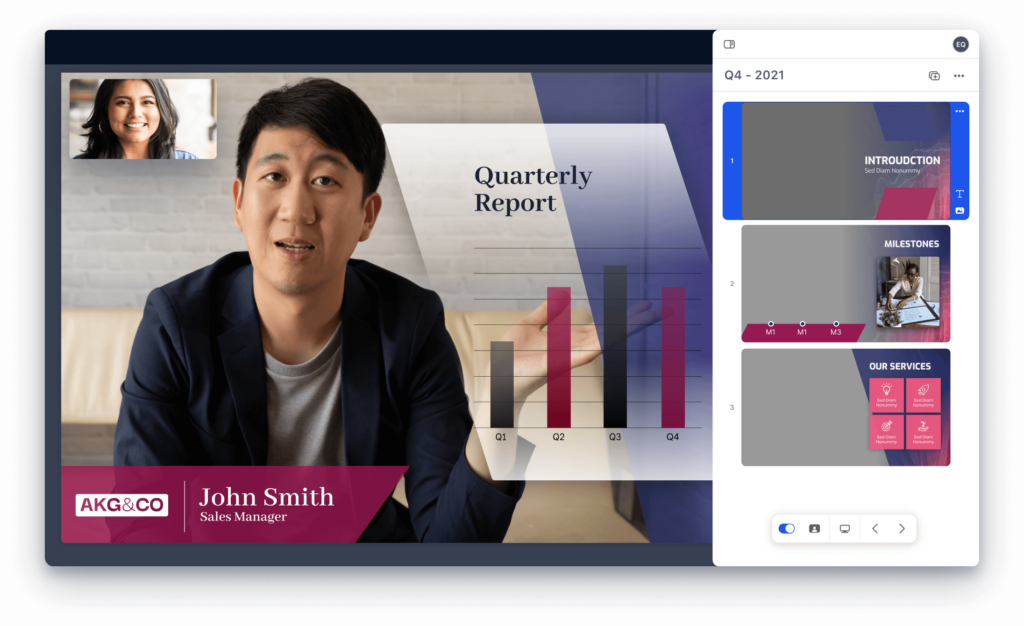
This flexibility ensures your message lands—whether you’re in a room, on Zoom, or sending a recorded update.
Visme Free alternative: How Prezi compares
A free plan is often the best way to test a new tool.
Visme is known for its generous free offering, with about 80% of its features available right away. Prezi also offers a free plan that lets you create and share dynamic presentations using core features.
As with most free plans, the trade-offs usually include:
- Limited storage
- Branded exports
- Restricted access to premium assets
Still, Prezi’s free plan makes it an excellent Visme free alternative for anyone who wants to experience non-linear, AI-powered presentations without committing upfront.
Prezi vs Visme: Final Verdict
To be fair, Visme is still a great tool—especially if your work is heavily focused on infographics, data-driven reports, or satic visual content for social media or marketing. But if presentations are your primary output, and you want movement, storytelling, and adaptability, Prezi is the stronger choice.
If you’re deciding between Prezi vs Visme, the right choice depends on what you create most often.
- Choose Visme if you need a wide variety of static visual content.
- Choose Prezi if you want presentations that engage, persuade, and adapt in real time.
As an AI-powered alternative to Visme, Prezi doesn’t just help you design faster—it helps you communicate better.
If you’re still using Visme, you may be missing out. Stop wasting time on templates and static slides. Try Prezi for free and see how much more powerful your presentations can be.
Frequently Asked Questions
Is Prezi a good alternative to Visme?
Yes. Prezi is a strong Visme alternative for anyone who focuses primarily on presentations. While Visme excels at static visual content like infographics and reports, Prezi is purpose-built for dynamic, engaging presentations that use motion, storytelling, and real-time adaptability to keep audiences focused and involved.
How does Prezi compare to Visme for presentations?
When comparing Prezi vs Visme for presentations, the biggest difference is structure. Visme relies on traditional, linear slides, while Prezi uses a zoomable canvas that lets you move freely between ideas. This non-linear approach makes it easier to explain complex topics, adapt on the fly, and keep your audience engaged throughout.
Is Prezi an AI-powered alternative to Visme?
Yes. Prezi is an AI-powered alternative to Visme that goes beyond basic slide generation. Prezi AI creates a complete, visual presentation with a built-in narrative structure, designed specifically for storytelling. Instead of just laying out slides, it helps you organize ideas into a cohesive flow on a dynamic canvas.
Does Prezi offer a free alternative to Visme?
Prezi offers a free plan that allows you to create and share dynamic presentations using core features, making it a practical Visme free alternative for individuals and teams who want to try a non-linear presentation style. Like most free plans, it includes limitations such as branded presentations and restricted access to premium assets.
Can I collaborate with my team in Prezi?
Yes. Prezi is built for real-time collaboration. Teams can co-edit presentations live, leave comments, organize projects in shared folders, and use brand kits to ensure consistent colors, fonts, and logos across all presentations—even those created with AI.
What types of users benefit most from switching from Visme to Prezi?
Prezi is ideal for educators, presenters, sales teams, marketers, and anyone who presents ideas live or remotely. If your goal is to engage, persuade, and help audiences remember your message—rather than just display static visuals—Prezi is often the better choice.