Naba Ahmed
January 19, 2026
In a world saturated with information, how do you make your presentations stand out? The answer lies in understanding the art of effective communication. It’s about weaving together compelling narratives, impactful visuals, and confident delivery to create an experience that resonates with your audience. This comprehensive guide will equip you with the knowledge and tools to transform your presentations from ordinary to extraordinary. We’ll explore the key elements of effective presentations, delve into the power of visual storytelling, and provide practical tips on designing slides for maximum impact. We will also share resources for finding the best presentation examples and how Prezi AI can revolutionize your presentation creation process. Let’s turn your next presentation into a masterpiece.
Key Takeaways
- Think visually: Transform data into compelling visuals and use storytelling to create a presentation that resonates with your audience. Prioritize concise language and impactful imagery.
- Design with purpose: Every element, from color and font to layout and white space, contributes to a cohesive and engaging presentation. Keep it clean, accessible, and on-brand.
- Practice makes perfect: Rehearse your delivery, paying attention to your body language, vocal tone, and how you handle questions. Preparation builds confidence and ensures a smooth presentation.

What makes a PowerPoint presentation stand out?
Crafting a presentation that truly connects with your audience goes beyond simply putting information on slides. It’s about creating an experience that informs, entertains, and inspires. Think of your presentation as a conversation, not a lecture. This shift in perspective can significantly impact how you design and deliver your message. Whether you’re using Prezi or PowerPoint, the principles of effective communication remain the same.
Key elements of effective presentations
Several key elements contribute to a presentation’s effectiveness. Start with the words on your slides. Is the language concise and impactful? Does it reinforce your message? Effective PowerPoint presentations demand careful consideration of every word.
Next, consider the structure. A logical flow is crucial for guiding your audience. A clear structure helps your audience follow along and retain information. Remember, the best approach depends on your content and audience. There’s no single solution for every presentation.
Overall design matters. Visuals, typography, and layout all influence how your audience perceives your message. A visually appealing presentation enhances understanding and keeps your audience engaged.
The Impact of visual storytelling
A compelling narrative can transform a dry presentation into a memorable experience. Storytelling adds life and intrigue, making your points relatable and memorable.
When incorporating stories, consider your audience and message. Choosing the right story is key to maximum impact. Think about the emotional connection you want to create and how your story can best serve your goals. A well-structured story engages and persuades, making your presentation more effective.
8 characteristics of powerful PowerPoint presentations
Want to create PowerPoint presentations that truly resonate with your audience? Here are eight key characteristics to focus on:
Structure content clearly
A disorganized presentation can leave your audience confused. Think of your presentation as a story. Structure your content logically with a clear beginning, middle, and end. This narrative flow will make your message more engaging and memorable, keeping your audience hooked from start to finish.
Create compelling visuals
Visuals are crucial for grabbing attention and conveying information effectively. Think high-quality images, icons, and illustrations that reinforce your message. Prezi AI can help generate visuals based on your outline, saving you time and ensuring a cohesive look.
Write concise content
Slides crammed with text are a surefire way to lose your audience. Keep your text concise and to the point. The 7×7 rule is a good guideline: aim for a maximum of seven lines per slide and seven words per line. This approach improves audience comprehension and keeps them focused on what you’re saying. Learn how to apply the 7×7 rule to your presentations.
Visualize data effectively
Data can be powerful, but only if it’s presented clearly. Transform raw data into easy-to-understand visuals like charts, graphs, and infographics. Effective data visualization makes complex information accessible, helping your audience grasp key insights quickly.
Tell engaging stories
Stories resonate with audiences on an emotional level, making your message more impactful. When choosing a story, consider your audience and the overall message you want to convey. Think about the emotional impact you want to create and select a story that aligns with your goals.
Use animations and transitions
Animations and transitions, when used thoughtfully, can add dynamism and visual interest. They can highlight key information, guide your audience’s attention, and create a more immersive experience. Prezi AI presentations are designed to be captivating and interactive.
Design for accessibility
An accessible presentation ensures that everyone in your audience can understand and engage with your content. Use clear fonts, sufficient color contrast, and alt text for images. Consider providing captions or transcripts for videos. Tailoring your presentation ensures inclusivity and maximizes impact. Review these PowerPoint examples for accessible design inspiration.
Maintain brand consistency
If you’re presenting on behalf of a company or organization, maintaining brand consistency is essential. Use your brand’s colors, fonts, and logo throughout your presentation. This reinforces your brand identity and creates a professional, cohesive look.
Design slides for maximum impact
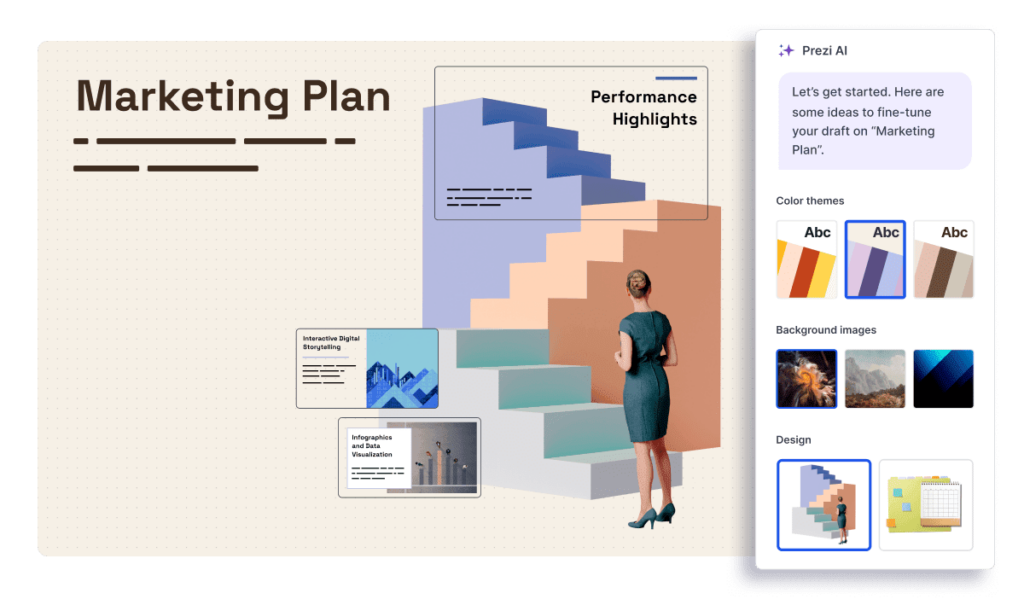
Even with a brilliant idea, a poorly designed presentation can fall flat. Think of your slides as the visual representation of your message; they need to be just as compelling as the words you speak. This means carefully considering everything from color palettes and fonts to the layout and balance of text and visuals. When these elements work together harmoniously, your presentation becomes more engaging, persuasive, and memorable.
Choose effective colors and fonts
Color and font choices impact how your audience perceives your presentation. Think about your brand’s identity and the overall tone you want to convey. Are you going for a professional, corporate feel? Or something more creative and energetic? Also, your font choices should be readable and reflect your brand’s personality. Avoid overly decorative fonts that can distract from your message. Instead, opt for clean, modern fonts that are easy on the eyes, even from a distance.

Use smart layout and white space
For slide design, less is more. Cluttered slides overwhelm your audience and make it difficult for them to absorb key information. The 7×7 rule is a great guideline: aim for a maximum of seven lines per slide and seven words per line. This approach forces you to be concise and helps your audience focus on the most important points. Embrace white space—the empty areas around your content—to give your slides a clean, uncluttered look. This improves readability and allows your visuals to breathe.
Balance text and visuals
Visuals are powerful tools for storytelling and engagement. Think about how you can use images, icons, and other visual elements to complement your text and bring your message to life. Prezi AI can be a game-changer, offering dynamic designs and interactive elements that captivate your audience. However, remember to strike a balance. Too much text can bore your audience, while too many visuals can be distracting. The key is to use visuals strategically to reinforce your key points and create a memorable presentation experience. Think about how you can use fewer words to improve audience attention and comprehension. This approach keeps your audience engaged and enhances the overall impact of your message. It encourages you to focus on key information and strengthens your presentation skills.
Write content that captivates
Your presentation’s design is only as good as the words on your slides. Compelling content is key to keeping your audience engaged and making your message memorable. Here’s how to write content that truly captivates:
Structure your presentation
A clear structure is essential for any effective presentation. Think of your presentation as a story with a beginning, middle, and end. Start by introducing your topic and setting the stage for what’s to come. Then, develop your key points in the middle section, providing supporting evidence and examples. Finally, summarize your main takeaways and leave your audience with a clear call to action. This narrative structure, much like the presentations created with Prezi, helps guide your audience through your message and ensures they stay on track.
Write engaging headlines
Headlines are crucial for grabbing your audience’s attention and setting the tone for each section of your presentation. Think about the key message you want to convey and craft headlines that are concise, intriguing, and relevant to your topic. A strong headline can pique your audience’s curiosity and encourage them to learn more. When choosing your story type, consider your audience and the desired emotional impact. Experiment with different phrasing and keywords to find what resonates best with your target audience.
Use bullet points effectively
Less is more when it comes to text on slides. Bullet points are your friend, but use them strategically. Instead of dense paragraphs, opt for concise bullet points that highlight the most important information. This approach improves audience comprehension and allows you to focus on key takeaways. The 7×7 rule—no more than seven words per line and seven lines per slide—can be a helpful guideline. Remember, your slides should support your spoken words, not replace them.
Turn data into visual stories
Data is often the backbone of a compelling presentation, but dense numbers on a slide can quickly lose your audience. Instead of overwhelming viewers with raw data, transform those figures into visual stories that resonate. This section explores how to select the right charts and graphs, create effective infographics, and make numbers memorable.
Select the right charts and graphs
Choosing the right visual representation for your data is the first step. A simple bar graph might be perfect for comparing sales figures across different quarters, while a pie chart could effectively illustrate market share. Line graphs are ideal for showing trends over time, and scatter plots can reveal correlations between different data points. Consider what message you want to convey and select the chart or graph that best illustrates that point. Effective PowerPoint presentations hinge on clear communication, and the right chart can make all the difference.
Create effective infographics
Infographics combine visuals and minimal text to present complex information in a digestible format. Think of them as visual summaries of your data points. By using fewer words, you improve audience attention and comprehension, allowing your key takeaways to shine. Start by distilling your data down to its most essential components. Then, explore different visual metaphors and icons to represent those concepts. Prezi Design offers a wide range of templates and resources to help you create polished and professional infographics. Remember, the goal is to make data accessible and engaging, transforming numbers into a story your audience can easily grasp. Consider keeping your text concise and impactful by limiting the amount of text on each slide.
Make numbers memorable
Numbers alone rarely stick in people’s minds. However, when you transform those numbers into a visual narrative, they become far more memorable. Think about using metaphors and visual analogies to represent your data. For example, if you’re presenting on customer growth, you could visualize it as a growing tree or an expanding network. Prezi AI can help you create dynamic and visually striking presentations that captivate your audience. By weaving your data into a compelling visual story, you’ll not only enhance understanding but also leave a lasting impression. Consider incorporating interactive elements and animations to further engage your viewers and reinforce your key messages.
Tell stories in your presentations
Storytelling is a powerful tool to connect with your audience, make your message memorable, and inspire action. Think of presentations not just as information delivery systems, but as opportunities to share narratives that resonate, whether you’re presenting to a small team or a large conference. Prezi Video makes it easy to incorporate storytelling elements into your presentations.
Build a narrative arc
Just like a good movie or novel, a presentation needs a narrative arc. This structure typically involves setting the scene, introducing a challenge, building tension, reaching a climax, and offering a resolution. This framework provides a clear path for your audience to follow, making your message more engaging and easier to understand. Consider what story will resonate with your audience and support the purpose of your presentation. Are you aiming to inspire, persuade, or educate? Choosing the right narrative structure is key to achieving your objective.
Use analogies
Analogies are a fantastic way to explain complex ideas in simple terms. They create a bridge between the familiar and the unfamiliar, helping your audience grasp new concepts quickly. When using analogies, make sure they are relevant to your audience and easy to understand. A well-chosen analogy can transform a dry, technical explanation into a vivid and memorable point. Think about your audience’s background and interests when selecting analogies to ensure they hit the mark. Remember to set the scene and create a physical space for your story to unfold, making it more relatable and engaging.
Connect with your audience
The most impactful stories are those that resonate with the audience on a personal level. Find ways to connect your narrative to their experiences, values, and aspirations. One effective technique is to share authentic stories from your own experience or the experiences of others. This adds a human touch to your presentation and builds trust with your audience. Another approach is to use a converging ideas structure, showing how different concepts come together to form a single, powerful message. This helps your audience understand the bigger picture and see the relevance of your presentation to their own lives. By weaving together different strands of thought, you create a cohesive and compelling narrative that leaves a lasting impression.
Engage your audience
Getting your audience to truly connect with your presentation involves more than just great visuals and compelling content. It requires creating an experience that draws them in and keeps them interested. Here’s how to transform your presentation from a passive display of information into an active dialogue with your viewers.
Use animations and transitions
Animations and transitions, when used thoughtfully, can significantly boost your presentation’s visual appeal. Think of them as the subtle cues that guide your audience’s attention, creating a dynamic flow that keeps them focused and engaged. Rather than overwhelming your viewers with constant movement, use subtle animations to highlight key information, introduce new elements smoothly, and create a sense of progression. For more inspiration, check out these best practices for animations. Prezi presentations offer a unique zooming user interface, creating a more dynamic and engaging experience than traditional slide-based presentations.
Incorporate multimedia
Using multimedia elements like videos, audio clips, and images can transform a text-heavy presentation into a rich, engaging experience. These elements break up the monotony of slides filled with words and cater to different learning styles. A well-placed video can illustrate a complex concept, while a powerful image can evoke emotion and create a lasting impression. By incorporating multimedia, you make your content more accessible and memorable for a wider range of viewers. Prezi makes it easy to integrate various multimedia elements directly into your presentations, enhancing the visual storytelling experience.
Add interactive features
Want to take audience engagement to the next level? Consider adding interactive features like polls, quizzes, and clickable elements. These tools transform your presentation from a one-way lecture into a dynamic conversation. By encouraging active participation, you create a more immersive and memorable experience for your audience. Interactive elements allow viewers to interact directly with the content, making them feel more involved and invested in the information you’re sharing. Prezi offers various interactive features, including embedding quizzes and polls directly within your presentations, making them more engaging and dynamic.
Use design trends
Presentation design trends are constantly evolving. Staying current on best practices helps create presentations that are both visually appealing and effective. Here are a few design trends to consider:
Embrace minimalism
Minimalism is a design trend that emphasizes simplicity and clarity. In presentations, minimalism helps focus your audience’s attention on key messages. By removing unnecessary elements, such as excessive text or visuals, you create a more impactful and memorable presentation. A well-structured story, free from distractions, can effectively engage and persuade your audience, making your presentation more effective. This is especially helpful in corporate settings, where presentations often need to convey complex information concisely.
Use bold typography and colors
Bold typography and vibrant colors can make your presentations more visually appealing and help key points stand out. Think carefully about your wording, structure, data visualization, and overall design when creating your slides. Experiment with different font sizes, weights, and colors to see what works best for your content and brand.
Ensure accessibility
Accessible design ensures that everyone, regardless of their abilities, can understand and engage with your presentation. Using clear and concise language improves audience attention and comprehension. It also encourages presenters to focus on key information, strengthening their presentation skills. Consider providing captions or transcripts for audio and video content, and use sufficient color contrast to make text easy to read. Following accessibility guidelines benefits those with disabilities and creates a more inclusive experience for all.
How Prezi AI elevates your presentations
Designing a powerful presentation traditionally takes hours—structuring content, choosing visuals, refining layouts, and ensuring everything flows logically. Prezi AI changes that experience entirely by helping you move from idea to polished presentation in minutes.
With Prezi AI, you can start with a simple prompt or outline and instantly generate a dynamic, visually engaging presentation. The AI intelligently structures your content, suggests visuals that support your message, and applies motion-based storytelling that guides your audience through your ideas. Instead of static slides, you get a presentation that feels more like a narrative—one that naturally keeps attention and improves understanding.
Prezi AI also removes common design roadblocks. It helps maintain visual consistency, balance text and visuals, and apply best practices automatically, so you don’t have to be a design expert to create professional-looking presentations. Whether you’re visualizing data, building a pitch deck, or creating internal updates, Prezi AI adapts to your content and purpose.
Beyond speed and aesthetics, Prezi AI empowers better storytelling. By organizing information spatially and visually, it makes complex ideas easier to follow and more memorable. This allows presenters to focus on what truly matters: refining their message, practicing delivery, and connecting with their audience.
In short, Prezi AI doesn’t just help you build presentations faster—it helps you create presentations that communicate more clearly, engage more deeply, and leave a lasting impression.
Find PowerPoint tools and resources
Once you have a solid grasp of presentation design principles, finding the right tools and resources can bring your vision to life. Plenty of options are available to help you create stunning presentations, from pre-designed templates to AI-powered design tools.
Find images and icons
High-quality visuals are essential for effective presentations. Compelling images and icons elevate your slides, making them more engaging and easier to understand. Many online resources offer free and paid stock photos, illustrations, and icons. When selecting visuals, ensure they are relevant to your content, visually appealing, and consistent with your overall design.
Leverage AI for design
Artificial intelligence is transforming presentation creation. Prezi AI offers tools for intelligent design suggestions, content recommendations, and real-time collaboration. This technology streamlines your design process, helps you explore new creative avenues, and creates more dynamic presentations. To harness the power of AI to generate entire presentations, explore resources like Prezi’s guide on AI-generated presentations.
Deliver your presentation confidently
Even with the most dazzling slides, a presentation falls flat if the delivery isn’t strong. Confidence is key, and that comes from thorough preparation and practice.
Practice your delivery
Don’t wait until the last minute to rehearse. Ideally, start practicing at least two weeks in advance, working backward from your presentation date to schedule dedicated practice sessions. This gives you ample time to refine your talking points, smooth out transitions, and get comfortable with the flow. Use Prezi Video to record yourself and identify areas for improvement. Pay attention to your pace, clarity, and the overall impact of your message. Each practice run builds your confidence and reduces the chance of stage fright.
Use effective body language and voice
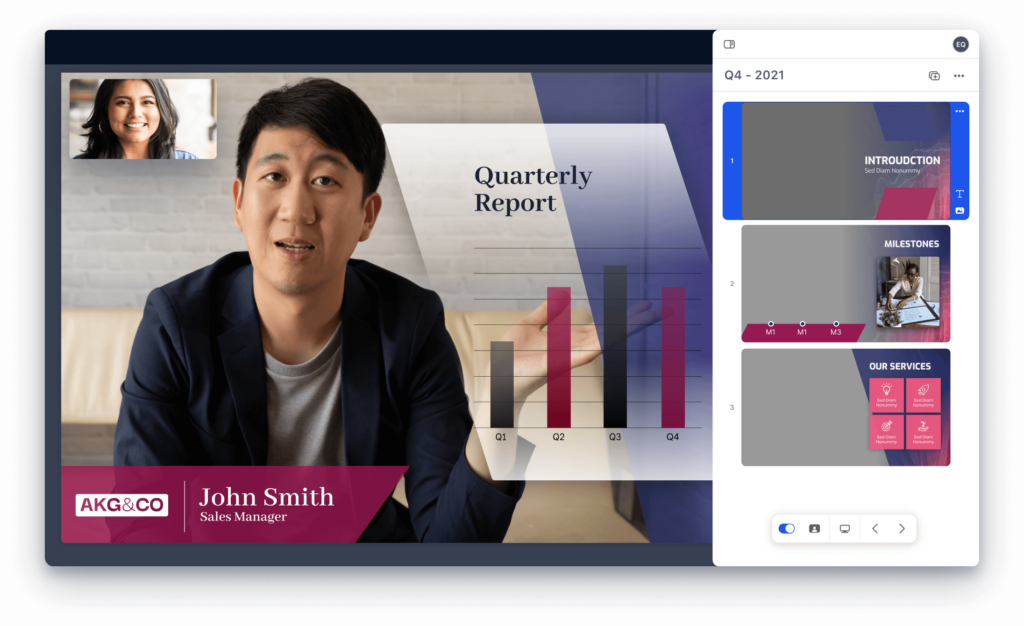
Your voice and body language are just as important as the words you use. Vary your vocal pace to keep the audience engaged—too fast, and they’ll struggle to keep up; too slow, and they’ll lose interest. Project your voice clearly and modulate your tone to emphasize key points. Maintain eye contact with your audience to create a connection. If you’re presenting on a larger stage, move around a bit to add visual interest and maintain engagement. Natural hand gestures can also help emphasize your points, but avoid fidgeting or distracting movements. A confident posture and a genuine smile can go a long way in making a positive impression.
Handle Q&A
The Q&A session can be the most nerve-wracking part of a presentation, but with the right approach, you can handle it with grace. Before your presentation, anticipate potential questions and formulate clear, concise answers. During the Q&A, listen attentively to each question and rephrase it to ensure everyone understands. If you don’t know the answer, it’s perfectly acceptable to say so and offer to follow up later. Refer back to your presentation’s core message when answering questions to maintain focus and reinforce your key takeaways. A well-handled Q&A session can strengthen your credibility and leave a lasting positive impression.
How to create presentations that stand out
Creating presentations that truly stand out isn’t about flashy slides or overwhelming your audience with information. it’s about clarity, connection, and confidence. When you combine purposeful design, visual storytelling, and thoughtful delivery, your presentations become experiences people remember. Tools like Prezi AI make this process faster and more intuitive by helping you turn ideas into dynamic, visually engaging stories without starting from scratch. Whether you’re pitching an idea, teaching a concept, or inspiring action, the right approach—and the right tools—can elevate every presentation you create. Now it’s your turn to apply these principles and transform your next presentation into something unforgettable. Get started using Prezi AI to make memorable presentations.
Frequently Asked Questions
How can I make my presentations more engaging? Think of your presentation as a conversation, not a lecture. Use visuals, storytelling, and interactive elements to connect with your audience on an emotional level. A clear structure, concise language, and dynamic delivery will keep them interested from beginning to end. Consider incorporating multimedia, like videos and audio clips, and interactive features such as polls and quizzes. Don’t forget the importance of body language and vocal delivery when presenting.
What’s the best way to structure a presentation? A logical flow is essential. Think of your presentation as a story with a beginning, middle, and end. Start by setting the context and introducing your main topic. Develop your key points in the middle, providing supporting evidence and examples. Conclude by summarizing your main takeaways and offering a clear call to action. This narrative structure helps your audience follow along and retain information.
How can I use visuals effectively in my presentations? Visuals should complement your message, not distract from it. Choose high-quality images, icons, and illustrations that reinforce your key points. Use charts and graphs to present data clearly and concisely. Remember to balance text and visuals, creating a clean and uncluttered look. Tools like Prezi AI can help you generate visuals and create dynamic designs.
What are some tips for writing compelling presentation content? Keep it concise. Use bullet points to highlight key information and avoid dense paragraphs. Write engaging headlines that capture your audience’s attention. Tell stories and use analogies to make your message relatable and memorable. Remember, your slides should support your spoken words, not replace them.
How can I improve my presentation delivery? Practice is key. Rehearse your presentation multiple times to get comfortable with the flow and refine your delivery. Pay attention to your body language and voice modulation. Make eye contact with your audience and use natural hand gestures. Be prepared for the Q&A session by anticipating potential questions. Most importantly, project confidence and be yourself.
How does Prezi AI help me create better presentations faster? Prezi AI simplifies the entire presentation process by transforming your ideas into visually engaging, well-structured presentations in minutes. Instead of starting with a blank slide, you can input a topic or outline and let Prezi AI generate a dynamic presentation complete with visual storytelling, smart layouts, and engaging motion. This allows you to focus less on slide design and more on refining your message and delivery—saving time while producing more impactful presentations.